
Hi everyone,
I’ve been following the Articulated Robots tutorial series which has helped me to create a self navigating diff drive robot.
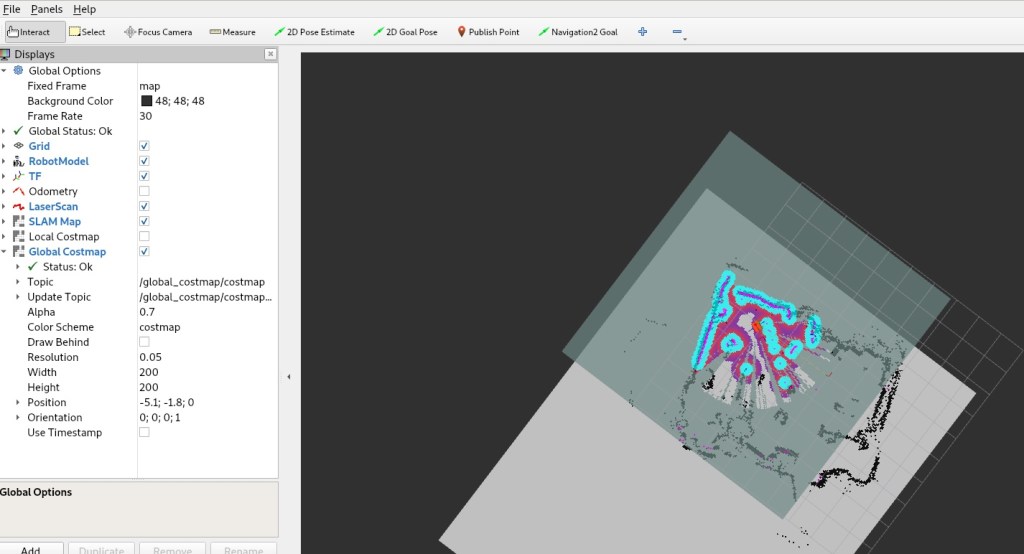
One issue I ran into after implementing Nav2 was that my Global Costmap was offset from the robot.

This ended up being a pretty easy fix. In your Nav2 configuration you can simply set rolling_window to true. This will centre the costmap on the robot as it moves around.

A second issue was the size of the costmap. I was only able to set navigation waypoints that were within 5m (note the size of the grey shading). To get around this you can use nav2 parameters again to increase the width and height. In my case I doubled the default (from 5m to 10m).
This is the config I ended up with:
global_costmap:
  global_costmap:
    ros__parameters:
      rolling_window: true
      width: 10
      height: 10
Thanks to these links for putting me on the right track:
 What I Broke - Programming and Web Development
thank you. you actually saved my life. but one question, where did you add those configurations? because the nav2_params.yaml do not contain such parameters for the global_costmap
LikeLike
Hey Judz,
It’s been a while so I dont remember the reason but it looks like I ended up switching it to local costmap instead. There’s an example at the bottom of this page here: https://navigation.ros.org/configuration/packages/configuring-costmaps.html
LikeLike
i actually ended up giving up and sending goals within 5m in the negative y direction as the occupancy grid generated in rviz2 is limited only in this direction. i’ve looked everywhere and couldn’t find the source of the problem. i know it’s in the map server but it just ends there.
anyway thank you for replying! i will be remember you for the rest of my thesis
LikeLike
No worries Judz, I’m glad to hear you managed to find a solution. Good luck with your thesis too!
LikeLike