Just a quick post on an error I ran into today when trying to create an AJAX image upload with Ruby on Rails. When submitting an AJAX form I received the following error:
POST http://192.168.1.3:3000/uploads 406 (Not Acceptable)
It turns out that there is a fairly simple (and admittedly obvious) solution. Ensure that your controller has an appropriate response for JavaScript files:
i.e. Form:
{:multipart => true}, :remote => 'true') do |f| %>


       prohibited this image from being saved:


     'button' %>

   @upload.product_id %>
Form JavaScript:
/* Wait for document to load */
$(document).ready(function() {
    create_ajax_form('new_upload');
})

/* Create an ajax form */
function create_ajax_form(form_id){

   //Handle ajax submission
   $j('#' + form_id).submit(function(){

       //Send for data
       $j.post($j(this).attr("action"), $j(this).serialize(), null, "script");

       //Return false
       return false;
   });
}
Controller Action:
#Create an upload
  def create

    #Create vars
    @upload = Upload.new(params[:upload])

    #Create responses
    respond_to do |format|
      if @upload.save

        #Retrieve product
        @product = Product.find_by_id(@upload.product_id)

        #Create success responses
        format.html { redirect_to @product, :notice => 'Image Added Successfully!'}
        format.js
      else

        #Create error responses
        format.html { render :action => 'new'}
        format.js
      end
    end
  end
You can also close the modal popup manually by using the following JavaScript:
$('#test_modal').modal('hide')
Adjust Modal Width:
In order to adjust the modal width you have two options, Javascript or CSS. You can use the following JavaScript mentioned on GitHub:
   $('#test_modal').modal({
        backdrop: true,
        keyboard: true,
        show: false \remove this if you don't want it to show straight away
    }).css({
        width: 'auto',
        'margin-left': function () {
            return -($(this).width() / 2);
        }
    });
body .modal-admin {
    //new custom width
    width: 750px;
    //must be half of the width, minus scrollbar on the left (30px)
    margin: -345px 0 0 -375px;
}
Show modal when the user scrolls past certain div
I’ve received another request on how to show the modal when a user scrolls to a certain div. The following should work, but please let me know if you have any issues.
/* Wait for document to load */
$(document).ready(function(){

$(window).scroll(function(){

//Retrieve scroll distance from top
var top = $(window).scrollTop();

//Retrieve the divs distance from top of page
var div_distance = $('my_div').offset().top;

//Use this if you want a bit of a variable distance, for instance if they scroll 150 pixels past the div
var buffer_distance = 150;

//Check if scrolled past div
if(top >= div_distance && top <= (div_distance + buffer_distance)){

//Show modal - you may want to add checks etc to see if it's already show
$('#test_modal').modal('show');

} else {

//Hide the modal, have scrolled past - you may want to add some checks to see if it's already hidden etc
$('#test_modal').modal('hide');
}
});
});
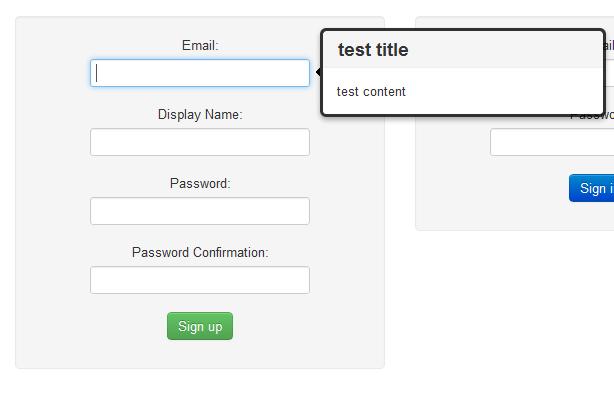
Just a quick post on how easy it is to implement a popover with twitter bootsrap:
JavaScript:
//Create tooltips for login/signup forms
function create_tooltips(){

    //Create vars
    var titles = ['test title']
    var contents = ['test content'];
    var fields = ['#user_email'];

    //Loop through each field and assign tooltip
    for(var i = 0; i < fields.length; i++){

        //Create vars
        var field = $(fields[i]);
        var title = titles[i];
        var content = contents[i];

        //Ensure field found
        if(field){

            //Create popover
            $(field).popover(
                {
                    animation: true,
                    placement: 'right',
                    selector: false,
                    trigger: 'hover',
                    title: title,
                    content: content,
                    delay: 0
                });
        }
    }
}
Form:
     resource_name, :url => registration_path(resource_name), :class => 'form-vertical') do |f| %>


         'btn btn-success' %>
Result: Popover - Twitter Bootstrap
That’s all there is to it, if you haven’t had a chance to check it out yet make sure you head on over to the official site – there are some pretty neat features.
Had a bit of a muck around with jQuery sliders today, just though I’d post the code I used to set a default value in case anyone else has a use for it:
Just sub whatever you want your default slider value to be in place of the 100. The jQuery documentation is also pretty useful if you’re chasing any more info: jQuery Slider Documentation
Ran into a bit of a problem with jQuery today, not entirely sure what the issue was but apparently it did not like me using the .get() function. I received the following error:

 What I Broke - Programming and Web Development