I wanted to use ina219 with pca9685 but they shared the same i2c address 0x4: 0.
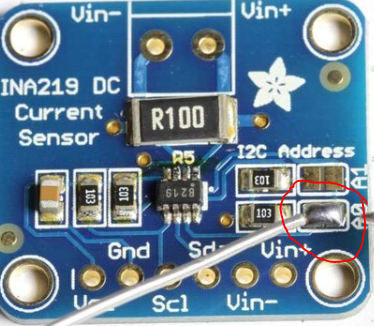
Luckily, there’s a fairly easy fix for this. All we need to do is solder two pins together. We’re going to bridge a0 and this will change our address to 0x41.
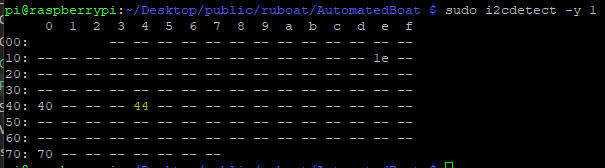
In order to check these run sudo i2cdetect -y 1 pm the raspberry pi:
After soldering it becomes:
You can solder a combination of pins for different addresses:
None = 0x40 (default)
A0 = 0x41
A1 = 0x44 (the one I’ve soldered to get 44)
A0 + A1 = 0x45
I’ve just setup an INA219B Voltage/Current sensor on my RaspberryPi. Just thought I’d link the tutorials and libraries I used – there’s a lot of really useful info out there.
Enable Low Power Between Reads ina.configure(ina.RANGE_16V)
while True:
print "Voltage : %.3f V" % ina.voltage()
ina.sleep()
time.sleep(60)
ina.wake()
If you’re getting the following error:
OSError: [Errno 121] Remote I/O error
Run the following command:
i2cdetect -y 1
And check to ensure that your device is showing up on 40. If it’s a different number you’ll just need to update the address in your code e.g. (0x40, 0x41, etc.)

 0.
0.


 What I Broke - Programming and Web Development