Refresh Folder Hotkey – Sublime Text 2

Hey everyone,

Just a quick post on how to setup a refresh hotkey in Sublime on Windows. All you have to do is the following:

1) Open sublime
2) Select Preferences from the top menu and then click “Key Bindings – Default”
3) Go to the end of the file and add a comma to the last entry:

        //Original
	{ "keys": ["enter"], "command": "hide_panel", "context":
		[{"key": "panel", "operand": "incremental_find"}, {"key": "panel_has_focus"}]
	},
	{ "keys": ["shift+enter"], "command": "find_prev", "context":
		[{"key": "panel", "operand": "incremental_find"}, {"key": "panel_has_focus"}]
	},
	{ "keys": ["alt+enter"], "command": "find_all", "args": {"close_panel": true},
		"context": [{"key": "panel", "operand": "incremental_find"}, {"key": "panel_has_focus"}]
	}

        //Modified
        //Original
	{ "keys": ["enter"], "command": "hide_panel", "context":
		[{"key": "panel", "operand": "incremental_find"}, {"key": "panel_has_focus"}]
	},
	{ "keys": ["shift+enter"], "command": "find_prev", "context":
		[{"key": "panel", "operand": "incremental_find"}, {"key": "panel_has_focus"}]
	},
	{ "keys": ["alt+enter"], "command": "find_all", "args": {"close_panel": true},
		"context": [{"key": "panel", "operand": "incremental_find"}, {"key": "panel_has_focus"}]
	}

4) Add the following entry:

//Custom
{ "keys": ["f5"], "command": "refresh_folder_list" }

Now all you have to do is save the file and F5 will now refresh your project! If you want to change the hotkey, simply switch [“f5”] for another value.

Leave a comment below if you have any issues or tips!

FullCalendar Example with Client-Side Event Updates

Hey everyone,

I’ve been mucking around with FullCalendar recently and decided to share one of the prototypes I’ve ended up with. It basically lets the user change the events without having to do a postback. A user simply has to click the event, type in the changes and hit update.

I’ve posted the code below, however there’s also a zip which is a little easier to manage. Note that you’ll probably want to clean it up a little if you plan to use it in production. The following libraries and plugins are also used:
jQuery
jQuery UI
jQuery FullCalendar
jQuery miniColors

What it Looks Like:

Full Calendar Example with Client Side Edits

How to Use It:

It’s all pretty straight forward, but just in case any one runs into issues there are two parts to this example. First, you generate an event template. You can then drag and drop this template onto the calendar as many times as you want.

The second part allows you to edit existing events without posting back to the server. To do this, simply click an event and then make the necessary adjustments using the top panel on the right. Once you’re done, just press update event.

The example uses the standard title property, but also includes a few others: descriptions, price, available. You can change/remove these to suit your needs, just remember to pull them out of the JavaScript as well.

Zip:

Full Calendar Zip

Basic Example Page:


Background:

Border:

Text:


Description


One Hour
http://ajax.googleapis.com/ajax/libs/jquery/1.8.3/jquery.min.js http://js/jquery-ui-1.9.2.custom.min.js http://js/fullcalendar.js http://js/view_calendar.js http://js/jquery.miniColors.js

Basic JavaScript:

/* Wait for DOM to load etc */
$(document).ready(function(){

	//Initialisations
	initialise_calendar();
	initialise_color_pickers();
	initialise_buttons();
	initialise_event_generation();
	initialise_update_event();
});


/* Initialise buttons */
function initialise_buttons(){

	$('.btn').button();
}


/* Binds and initialises event generation functionality */
function initialise_event_generation(){

	//Bind event
	$('#btn_gen_event').bind('click', function(){

		//Retrieve template event
		var template_event = $('#external_event_template').clone();
		var background_color = $('#txt_background_color').val();
		var border_color = $('#txt_border_color').val();
		var text_color = $('#txt_text_color').val();
		var title = $('#txt_title').val();
		var description = $('#txt_description').val();
		var price = $('#txt_price').val(); 
		var available = $('#txt_available').val();

		//Edit id
		$(template_event).attr('id', get_uni_id());

		//Add template data attributes
		$(template_event).attr('data-background', background_color);
		$(template_event).attr('data-border', border_color);
		$(template_event).attr('data-text', text_color);
		$(template_event).attr('data-title', title);
		$(template_event).attr('data-description', description);
		$(template_event).attr('data-price', price);
		$(template_event).attr('data-available', available);

		//Style external event
		$(template_event).css('background-color', background_color);
		$(template_event).css('border-color', border_color);
		$(template_event).css('color', text_color);

		//Set text of external event
		$(template_event).text(title);

		//Append to external events container
		$('#external_events').append(template_event);

		//Initialise external event
		initialise_external_event('#' + $(template_event).attr('id'));

		//Show
		$(template_event).fadeIn(2000);
	});
}


/* Initialise external events */
function initialise_external_event(selector){

	//Initialise booking types
	$(selector).each(function(){

		//Make draggable
		$(this).draggable({
			revert: true,
			revertDuration: 0,
			zIndex: 999,
			cursorAt: {
				left: 10,
				top: 1
			}
		});

		//Create event object
		var event_object = {
			title: $.trim($(this).text())
		};

		//Store event in dom to be accessed later
		$(this).data('eventObject', event_object);
	});
}


/* Initialise color pickers */
function initialise_color_pickers(){

	//Initialise color pickers
	$('.color_picker').miniColors({
		'trigger': 'show',
		'opacity': 'none'
	});
}


/* Initialises calendar */
function initialise_calendar(){

	//Initialise calendar
	$('#calendar').fullCalendar({
		theme: true,
		firstDay: 1,
		header: {
			left: 'today prev,next',
			center: 'title',
			right: 'month,agendaWeek,agendaDay'
		},
		defaultView: 'agendaWeek',
		minTime: '6:00am',
		maxTime: '6:00pm',
		allDaySlot: false,
		columnFormat: {
			month: 'ddd',
			week: 'ddd dd/MM',
			day: 'dddd M/d'
		},
		eventSources: [
			{
				url: 'calendar_events.json',
				editable: false
			}
		],
		droppable: true,
		drop: function(date, all_day){
			external_event_dropped(date, all_day, this);
		},
		eventClick: function(cal_event, js_event, view){
			calendar_event_clicked(cal_event, js_event, view);
		},
		editable: true
	});	

	//Initialise external events
	initialise_external_event('.external-event');
}


/* Handle an external event that has been dropped on the calendar */
function external_event_dropped(date, all_day, external_event){

	//Create vars
	var event_object;
	var copied_event_object;
	var duration = 60;
	var cost;

	//Retrive dropped elemetns stored event object
	event_object = $(external_event).data('eventObject');

	//Copy so that multiple events don't reference same object
	copied_event_object = $.extend({}, event_object);
	
	//Assign reported start and end dates
	copied_event_object.start = date;
	copied_event_object.end = new Date(date.getTime() + duration * 60000);
	copied_event_object.allDay = all_day;

	//Assign colors etc
	copied_event_object.backgroundColor = $(external_event).data('background');
	copied_event_object.textColor = $(external_event).data('text');
	copied_event_object.borderColor = $(external_event).data('border');

	//Assign text, price, etc
	copied_event_object.id = get_uni_id();
	copied_event_object.title = $(external_event).data('title');
	copied_event_object.description = $(external_event).data('description');
	copied_event_object.price = $(external_event).data('price');
	copied_event_object.available = $(external_event).data('available');

	//Render event on calendar
	$('#calendar').fullCalendar('renderEvent', copied_event_object, true);
}


/* Initialise event clicks */
function calendar_event_clicked(cal_event, js_event, view){

	//Set generation values
	set_event_generation_values(cal_event.id, cal_event.backgroundColor, cal_event.borderColor, cal_event.textColor, cal_event.title, cal_event.description, cal_event.price, cal_event.available);
}


/* Set event generation values */
function set_event_generation_values(event_id, bg_color, border_color, text_color, title, description, price, available){

	//Set values
	$('#txt_background_color').miniColors('value', bg_color);
	$('#txt_border_color').miniColors('value', border_color);
	$('#txt_text_color').miniColors('value', text_color);
	$('#txt_title').val(title);
	$('#txt_description').val(description);
	$('#txt_price').val(price);
	$('#txt_available').val(available);
	$('#txt_current_event').val(event_id);
}


/* Generate unique id */
function get_uni_id(){

	//Generate unique id
	return new Date().getTime() + Math.floor(Math.random()) * 500;
}


/* Initialise update event button */
function initialise_update_event(){
	var test = $('#calendar').fullCalendar( 'clientEvents');
	//Bind event
	$('#btn_update_event').bind('click', function(){

		//Create vars
		var current_event_id = $('#txt_current_event').val();

		//Check if value found
		if(current_event_id){

			//Retrieve current event
			var current_event = $('#calendar').fullCalendar('clientEvents', current_event_id);

			//Check if found
			if(current_event && current_event.length == 1){

				//Retrieve current event from array
				current_event = current_event[0];

				//Set values
				current_event.backgroundColor = $('#txt_background_color').val();
				current_event.textColor = $('#txt_text_color').val();
				current_event.borderColor = $('#txt_border_color').val();
				current_event.title = $('#txt_title').val();
				current_event.description = $('#txt_description').val();
				current_event.price = $('#txt_price').val();
				current_event.available = $('#txt_available').val();

				//Update event
				$('#calendar').fullCalendar('updateEvent', current_event);
			}
		}
	});
}

Stylesheet

body{
	font-family: "Helvetica Neue", Helvetica, Arial, sans-serif;
	font-size: 12px;
}

#content_wrapper{
	width: 820px;
	margin-left: auto;
	margin-right: auto;
}

#calendar{
	width: 650px;
	float: left;
}

.btn{
	font-size: 85%
	margin-top: 10px;
}

#event_generation_wrapper{
	float: left;
	width: 120px;
	background-color: #DDD;
	margin-left: 20px;
	margin-top: 40px;
	border: 1px solid #4297D7;
	background-color: #FCFDFD;	
	-moz-border-radius: 3px;
	-webkit-border-radius: 3px;
	border-radius: 3px;
	padding: 10px 5px 10px 5px;
}

#event_generation_wrapper .left{
	float: left;
	width: 70px;
}

#event_generation_wrapper .right{
	float: left;
	max-width: 25px;
	margin-left: 10px;
}

#event_generation_wrapper input{
	width: 112px;
}

#event_generation_wrapper textarea{
	width: 110px;	
	height: 50px;
}

#event_generation_wrapper .miniColors-triggerWrap{	
	margin-bottom: 5px;
}

#event_generation_wrapper .text{
	padding-top: 1px;	
	margin-bottom: 5px;
	line-height: 10px;
}


#external_events{
	float: left;
	width: 130px;
	background-color: #DDD;
	margin-left: 20px;
	margin-top: 40px;
	border: 1px solid #4297D7;
	background-color: #FCFDFD;	
	-moz-border-radius: 3px;
	-webkit-border-radius: 3px;
	border-radius: 3px;
}

#external_events .external-event{
	width: 100px;
	margin: 5px;
	font-family: Verdana, Arial, sans-serif;
	border: 1px solid #36C;
	padding: 3px;
	text-align: center;
	background-color: #36C;
	color: white;
	cursor: pointer;
	-moz-border-radius: 3px;
	-webkit-border-radius: 3px;
	border-radius: 3px;
}

#calendar .ui-widget-header{
	font-weight: normal;
	padding: 3px 3px 3px 3px;
}

#calendar .fc-header-title{
	font-weight: normal;
}

#external_event_template{
	display: none;
}

Basic List of Events (JSON):

[
    "0",
    {
        "allDay": "",
        "title": "Test event",
        "id": "821",
        "start": "2012-11-23 14:00:00",
        "end": "2012-11-23 15:00:00"        
    },
    "1",
    {
        "allDay": "",
        "title": "Test event 2",
        "id": "822",        
        "start": "2012-11-23 9:00:00",
        "end": "2012-11-23 10:00:00"
    },
    "2",
    {
        "allDay": "",
        "title": "Test event 3",
        "id": "823",        
        "start": "2012-11-24 8:00:00",
        "end": "2012-11-24 6:00:00"
    },
    "3",
    {
        "allDay": "",
        "title": "Test event 4",
        "id": "824",        
        "start": "2012-11-27 6:00:00",
        "end": "2012-11-27 7:00:00"
    }
]

Let me know if you have any issues or something to add!

Cheers,
Chris

jQuery DateTimePicker with Bootstrap

Hey everyone,

I ran into a bit of trouble today trying to get datetimepicker to work within bootstrap tabs. The dialog appeared however none of the buttons seemed to work. The fields also remained unpopulated.

It turned out the the issue was caused by the fact that I’d used jquery’s clone function to duplicate the tabs without reassigning field ids. This meant that there were multiple fields with the same id, confusing datetimepicker.

The solution I used was to dynamically assign all of the ids as each tab was displayed:


/* Bind tab change events: this has been done so that there is less js overhead */
function bind_tab_change_events(){

	//Bind change event
	$('.nav-tabs').bind('show', function(e){

		//Create vars
		var selected_file_id = $(e.target).data('file_id');

		//Initialisations
		initialise_time_pickers('#file_' + selected_file_id + ' .timepicker', selected_file_id);	
	})
}

/* Initalise timepickers */
function initialise_time_pickers(selector, unique_id){

	//Loop through each bound element
	$.each($(selector), function(index, value){

		//Set id - datepicker won't work without unique ids
		$(value).attr('id', $(value).attr('id') + '_' + unique_id);

		//Initialise datepicker		
		$(value).datetimepicker();
	});
}

UPDATE:
It looks like quite a few people hitting this post are looking for a bootstrap specific alternative, Sebastien has provided a link to one in the comments below:
Bootstrap DatetimePicker.

Another one that looks really good, a bit less clunky than any of the alternatives I’ve seen: http://tarruda.github.com/bootstrap-datetimepicker/

Plain timepicker: http://jdewit.github.com/bootstrap-timepicker/

Plain datepicker: http://www.eyecon.ro/bootstrap-datepicker/

Let me know if you have any questions!

Remove Disabled Attribute – Twitter Bootstrap

Hey everyone,

I was using Bootstrap’s disabled attribute today and just needed a way to remove it. Once again, jQuery has a quick and easy way to do this:


$('#my_input').removeAttr('disabled');

There’s a whole heap of documentation on the jQuery site: http://api.jquery.com/removeAttr/

Blocking Duplicate Payment – Paypal

Hey everyone,

Just a quick post on how to block duplicate payments with PayPal. All you have to do is pass an invoice parameter and then select the ‘block multiple payments per invoice ID’ option in PayPal. I’ve attached an extract from PayPal’s documentation below:

1. Login at https://www.paypal.com
2. Click the ‘Profile’ subtab
3. Under ‘Selling Preferences’ click ‘Payment Receiving Preferences’
4. Choose ‘Yes, block multiple payments per invoice ID’ if you wish to utilize this feature while passing the “invoice” variable
5. Scroll to the bottom and click the ‘Save’ button

To pass the invoice number for Website Payments Standard, you will need to add a line of code to your existing button code. You cannot add this code to a button originally created as encrypted. Example below:

<input type=”hidden” name=”invoice” value=”001″>

The documentation is available at the following link:
https://ppmts.custhelp.com/app/answers/detail/a_id/165

Uploadify – Limit to One Upload Only

Hey everyone,

Just a quick post detailing how to limit uploadify to a single file. Simply add the following settings to your uploadify initialisation:

multi: false
queueSizeLimit : 1
uploadLimit : 1


$(document).ready(function() {
     $('#file_upload').uploadify({
        'swf' : 'Html->url('/uploadify/uploadify.swf');?>',
	'uploader' : 'Html->url('/uploadify/uploadify.php');?>',
	'cancelImg' : 'Html->url('/webroot/uploadify/cancel.png');?>',
	'folder' : 'Html->url('/extraz/uploaded_by_all_users');?>',
	'auto' : true,
	'buttonText' : 'Browse',
	'multi' : false,
	'queueSizeLimit' : 1,
	'uploadLimit' : 1,
	'sizeLimit' : 1073741824,
	'debug' : true,
	'multi' : false,	        
	'onUploadProgress' : upload_progress_handler,
	'onUploadStart' : upload_start_handler,
	'onUploadSuccess' : on_upload_success,
	'onUploadError' : on_upload_error
     });
});

Once the upload limit is exceeded the onUploadError event is raised.

Cheers

Git with KDiff3 – Windows

Hey all,

Just a quick post showing the config I needed to use in order to get KDiff3 working with git. It took a while to get this working so hopefully it’ll be able to help someone else out.

#Config file
[user]
	email = test@test.com.au
	name = test
[core]
	editor = "C:\Program Files\Sublime Text 2\sublime_text.exe"
   
[apply]
    whitespace = fix

[color]
    branch = auto
    diff = auto
    interactive = auto
    status = auto


[core]
        pager = less -FRSX
        whitespace = cr-at-eol
        autocrlf = input
        excludesfile = /Users/test/.gitignore_global
        editor = mate -w

[alias]
        co = checkout
        lg = log --graph --pretty=oneline --abbrev-commit

[gui]
	recentrepo = Y:/Projects/Junk
	recentrepo = C:/xampp/htdocs/onlinemedia
[merge]
	tool = kdiff3

Screenshot of git config from GUI:

Git Config KDiff
Git Config KDiff

Running KDiff3:

Executing KDiff3
Executing KDiff3

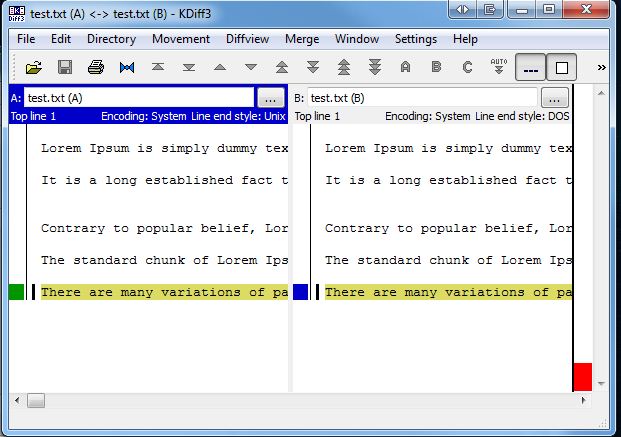
KDiff3 display:

KDiff3 Display
KDiff3 Display

Setup RVM on Ubuntu – Ruby on Rails

Hey everyone,

I’ve just done a fresh install of RVM using the guide below. There were a few dependencies missing, but other than that it all went pretty smoothly.

Link: http://stjhimy.com/posts/10-five-quick-steps-to-set-up-rvm-with-rails-2-and-rails3

Next time I do an install I’ll try to document the whole thing, but for now that link is probably one of the better/simpler guides I’ve come across. If you have any problems please leave a comment below and I’ll try to get back to you.

UPDATE:

Just another guide I’ve come across that seems to work well, this one is a complete “start to finish” one:
http://rails.vandenabeele.com/blog/2011/11/26/installing-ruby-and-rails-with-rvm-on-ubuntu-11-dot-10/

Heroku Timezones – Ruby on Rails

Hey everyone,

Just a quick post on how to adjust the timezone on Heroku, comes in handy when using the log files.

#Console
$ heroku config:add TZ=Australia/Brisbane

There is a fairly detailed StackOverflow post at the following link if anyone is interested in more info:
http://stackoverflow.com/questions/2719330/why-does-heroku-log-using-the-server-time-rather-than-the-rails-time-zone

The language options can also be found on the following wikipedia page:
http://en.wikipedia.org/wiki/List_of_tz_database_time_zones