Change i2c address of ina219

Hi everyone,

I wanted to use ina219 with pca9685 but they shared the same i2c address 0x4:
download0.

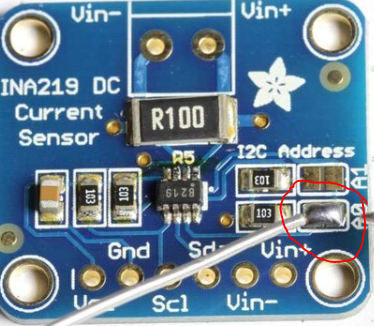
Luckily, there’s a fairly easy fix for this. All we need to do is solder two pins together. We’re going to bridge a0 and this will change our address to 0x41.

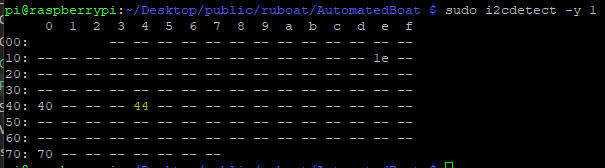
In order to check these run sudo i2cdetect -y 1 pm the raspberry pi:
download

After soldering it becomes:
download

You can solder a combination of pins for different addresses:
None = 0x40 (default)
A0 = 0x41
A1 = 0x44 (the one I’ve soldered to get 44)
A0 + A1 = 0x45

A4988 Stepper motor RaspberryPi

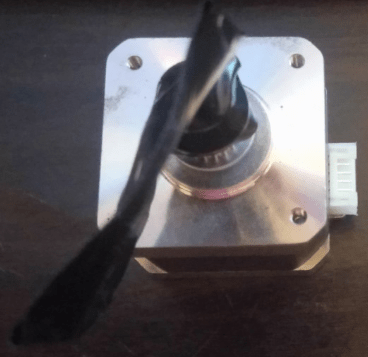
We’re using a 42shd0034-20B Geetech stepping motor taken from a 3d printer:
download

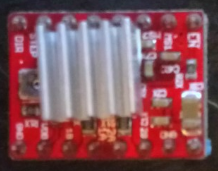
We’ll be driving it with an A4988 stepper motor controller. You can pick up five packs of these for less than $2 online – definitely worth having a few extras around:
download

The datasheet is available here: https://www.pololu.com/file/download/A4988.pdf?file_id=0J450

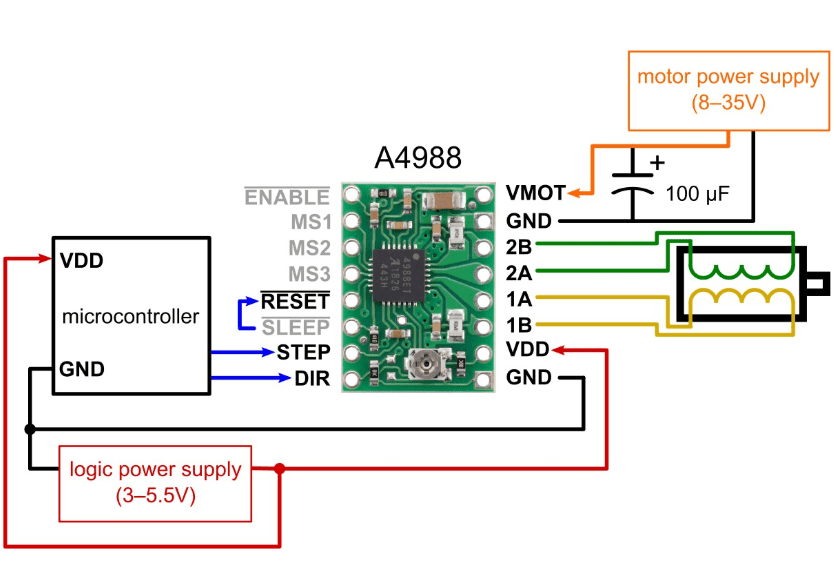
The following diagram illustrates what we’ll be doing:
download

Once everything is connected it’ll end up looking something like this:
download

To start, connect your stepping and direction pins. I’ve used GPIO16 for stepping and GPIO21 for direction:
download

Each time GPIO16 is set to HIGH it will make the stepper motor take one step. When the direction pin is HIGH the stepper motor will go clockwise, when it’s LOW, anti-clockwise.

If you’re not using the sleep functionality, connect the RESET and SLP pins together and then wire them directly to 3.3v:
download

Using a separate power source wire 12v to the GND and VMOT pins. You should also place a capacitor across these pins as close to the board as possible. Generally the longest leg is positive. You’ll also need to connect the external GND to the Raspberry Pi’s GND:
download

Connect the four pins of the stepper motor:
download

Connect the A4988 to 3.3v and common GND:
download

The code is pretty straight forward but I’ve provided a class below to help you get started:


# System imports
import RPi.GPIO as GPIO
from time import sleep

class StepperHandler():

__CLOCKWISE = 1
__ANTI_CLOCKWISE = 0

def __init__(self, stepPin, directionPin, delay=0.208, stepsPerRevolution=200):

# Configure instance
self.CLOCKWISE = self.__CLOCKWISE
self.ANTI_CLOCKWISE = self.__ANTI_CLOCKWISE
self.StepPin = stepPin
self.DirectionPin = directionPin
self.Delay = delay
self.RevolutionSteps = stepsPerRevolution
self.CurrentDirection = self.CLOCKWISE
self.CurrentStep = 0

# Setup gpio pins
GPIO.setmode(GPIO.BCM)
GPIO.setwarnings(False)
GPIO.setup(self.StepPin, GPIO.OUT)
GPIO.setup(self.DirectionPin, GPIO.OUT)

def Step(self, stepsToTake, direction = __CLOCKWISE):

print("Step Pin: " + str(self.StepPin) + " Direction Pin: " + str(self.DirectionPin) + " Delay: " + str(self.Delay))
print("Taking " + str(stepsToTake) + " steps.")

# Set the direction
GPIO.output(self.DirectionPin, direction)

# Take requested number of steps
for x in range(stepsToTake):
print("Step " + str(x))
GPIO.output(self.StepPin, GPIO.HIGH)
self.CurrentStep += 1
sleep(self.Delay)
GPIO.output(self.StepPin, GPIO.LOW)
sleep(self.Delay)

# Define pins
STEP_PIN = 16
DIRECTION_PIN = 21

# Create a new instance of our stepper class (note if you're just starting out with this you're probably better off using a delay of ~0.1)
stepperHandler = StepperHandler(STEP_PIN, DIRECTION_PIN, 0.0025)

# Go forwards once
stepperHandler.Step(200)

# Go backwards once
stepperHandler.Step(200, stepperHandler.ANTI_CLOCKWISE)

Unable to find a dom node for 19 – Slate.js

Hi everyone,

I ran into the following error while attempting to add an image to a slate.js editor today:

slate.js unable to find dom node for 19

The solution was to add a simple schema to my editor:


const schema = {
    blocks: {
        image: {
            isVoid: true
        }
    }
};
    spellCheck
    autoFocus
    ref={this.ref}
    value={this.state.value}
    onChange={this.onChange}
    onKeyDown={this.onKeyDown}
    onDrop={this.onDropOrPaste}
    onPaste={this.onDropOrPaste}
    renderNode={this.renderNode}
    renderMark={this.renderMark}
    className={classes.editor}
    readOnly={readOnly}
    onFocus={() => { this.setState({ changed: true }); }}
    schema={schema}

There’s more on schemas in the official documentation: https://docs.slatejs.org/guides/schemas

String to Color – Avatar Helpers

Hi everyone,

A quick post on a helper function I came across for generating avatars. This function generates a random color for the specified string:


export const stringToColor = string => {

let hash = 0;
let i;

for (i = 0; i < string.length; i += 1) {
hash = string.charCodeAt(i) + ((hash << 5) - hash);
}

let colour = '#';

for (i = 0; i > (i * 8)) & 0xff;
colour += `00${value.toString(16)}`.substr(-2);
}

return colour;
}

Thanks to oliviertassinari: https://github.com/oliviertassinari/SplitMe/blob/c25fe62187a856386fd0c43c51859d6f973d651e/src/main/member/Avatar.js#L8-L26

Access to fetch from origin has been blocked by CORS policy – AWS SAM Local

Hi everyone,

I’ve been using AWS SAM local lately and ran into a bit of an issue with CORS. It took a looong time to find a solution that worked for all of my local scenarios so hopefully this will be able to help someone else out.

Access to fetch at 'http://127.0.0.1:3000' from origin 'http://localhost:3001' has been blocked by CORS policy: Response to preflight request doesn't pass access control check: No 'Access-Control-Allow-Origin' header is present on the requested resource. If an opaque response serves your needs, set the request's mode to 'no-cors' to fetch the resource with CORS disabled.

The error above is fairly typical when working with APIs. The request will work from tools such as postman and fiddler but browsers will block it. These are a few good links that explain why CORS is necessary:
https://medium.com/@electra_chong/what-is-cors-what-is-it-used-for-308cafa4df1a
https://stackoverflow.com/a/29167709/522859

As for the solution, add the following to your template.yml:

  PreFlightFunction:
    Type: AWS::Serverless::Function
    Properties:
      Handler: functions/generic/cors.getPreflightHandler
      Runtime: nodejs8.10
      Events:
        GetEvent:
          Type: Api
          Properties:
            Path: /pages
            Method: options
            RestApiId: !Ref XXXApi
            Auth:
              Authorizer: NONE

If you haven’t already defined your api in your template.yml file there is a default/omitted one created for you. There are a few examples on the AWS github: https://github.com/awslabs/serverless-application-model/blob/release/v1.8.0/examples/2016-10-31/api_cognito_auth/template.yaml

The next thing to do is to create a handler for the options request:


/* Handles retrieving a specific page */
exports.getPreflightHandler = async (event, context, callback) => {
    callback(null, { body: {} }, headers: { 'content-type': 'application/json', 'Access-Control-Allow-Origin': '*', 'Access-Control-Allow-Headers': 'Content-Type,X-Amz-Date,Authorization,X-Api-Key,X-Amz-Security-Token', 'Access-Control-Allow-Methods': 'OPTIONS,GET,POST,PUT,PATCH,DELETE', 'Access-Control-Allow-Credentials': true }, statusCode: 200 })
};

I’ve moved all mine out to some helper methods but the above should be enough to get it working for you. Hopefully the AWS team will have a simpler solution soon but if you run into any issues in the meantime please let me know!

AWS SAM Request Extremely Slow – Fix

Hi everyone,

I’m currently using AWS SAM CLI with NodeJS and was surprised to find that the requests were significantly slower when run locally. Luckily, I came across a post that suggested adding –skip-pull-image to your start-api command:

sam local start-api --skip-pull-image

This brought my requests down to under a second. Thanks to the following link for the info: https://github.com/awslabs/aws-sam-cli/issues/134#issuecomment-406786704

Move Selection to Single Line – Visual Code

Hi everyone,

A quick post on how to merge a multiline block into a single line using Visual Studio Code:

-- From this
CREATE TABLE posts
(
    post_id INT IDENTITY(1,1) PRIMARY KEY,
    title VARCHAR(100),
    description VARCHAR(MAX),
    user_id VARCHAR(255) NOT NULL,
    created DATETIME NOT NULL,
    updated DATETIME NOT NULL,
    version INT NOT NULL,
    up_votes INT NOT NULL,
    down_votes INT NOT NULL,
    updated DATETIME NOT NULL
);

-- To this
CREATE TABLE posts ( post_id INT IDENTITY(1,1) PRIMARY KEY, title VARCHAR(100), description VARCHAR(MAX), user_id VARCHAR(255) NOT NULL, created DATETIME NOT NULL, updated DATETIME NOT NULL, version INT NOT NULL, up_votes INT NOT NULL, down_votes INT NOT NULL, updated DATETIME NOT NULL )

Simply highlight your code block, press F1, and then type “join lines”. Pressing enter will join everything. If you’re on a mac you can also use ctrl+j.

this.query is not a function – error when using promisify with mysql

Hi everyone,

I ran into the following error while attempting to promisify my node.js mysql transactions:

TypeError: this.query is not a function
    at rollback (/var/task/node_modules/mysql/lib/Connection.js:179:15)
    at rollback (internal/util.js:230:26)

This took a while to track down but it turns out that I needed to bind the connection after promisifying the function. Instead of:

util.promisify(connection.query);

Add bind to the end of it:

util.promisify(connection.query).bind(connection)

Thanks to the following stackoverflow post for the insight: https://stackoverflow.com/a/51690276/522859

Overriding Global Variables – AWS SAM Local

Hi everyone,

Today I’ve added local overrides to the global variables in my template.yml file. This was pretty finicky – a lot of conflicting suggestions out there unfortunately. These are the settings that ended up working for me.

local-env-var-overrides.json:

{
    "Parameters": {
        "RDS_HOSTNAME_TEST": "192.168.0.31"
    }
}

template.yaml

Globals:
  Function:
    Environment:
      Variables:        
        RDS_HOSTNAME_TEST:
          Type: String
          Default: 'DEFAULT'

aws sam local command:

sam local start-api --env-vars "local-env-var-overrides.json"

create.js

exports.createTrapHandler = async (event, context, callback) => {

	try {

        console.log("RDS_HOSTNAME_TEST: " + process.env.RDS_HOSTNAME_TEST)
        // Outputs: 192.168.0.31

This link ended up being pretty useful: https://www.npmjs.com/package/aws-sam-local

Get User Id in Lambda node.js

Hi everyone,

A quick post on where to find the user id (sub) in a lambda requested that has been authenticated with a congito authorizer.

You’ll be able to find everything you need in the event object under requestContext > authorizer > claims:


exports.viewContextHandler = async (event, context, callback) => {
    console.log(JSON.stringify(event.requestContext));
}

"requestContext": {
    "resourceId": "XXXXX",
    "authorizer": {
        "claims": {
            "at_hash": "XXXXX",
            "sub": "XXXXX-XXXXX-XXXXX-XXXXX-XXXXX",
            "aud": "XXXXX12341234512345XXXXX",
            "email_verified": "true",
            "token_use": "id",
            "auth_time": "1547371205",
            "iss": "https://cognito-XXXXX.com/XXXXX",
            "cognito:username": "XXXXX-XXXXX-XXXXX-XXXXX-XXXXX",
            "exp": "Sun Jan 13 10:20:05 UTC 2019",
            "iat": "Sun Jan 13 09:20:05 UTC 2019",
            "email": "XXXXX@XXXXX.XXXXX"
        }
    },
}