NavLink ListItems not Applying activeClassName class when Clicked On – ReactJS React-Router MaterialUI

Hi everyone,

A bit of a hairy issue I ran into today that took a while to track down. I’m using React Router with Material UI to render a Drawer as a sidebar:

The issue was that some links were not applying the expected activeclass:


	<ListItemText primary={
		
			About
		
	} />

After trawling through react-router I eventually found a post on github that mentioned a similar issue: https://github.com/ReactTraining/react-router/issues/4638

The solution turned out to be wrapping all relevant components with withrouter.
Uncaught SyntaxError: Unexpected token < – ReactJS Build

Hi everyone,

A ReactJS issue I ran into after running npm run build:

Uncaught SyntaxError: Unexpected token <

This one took a while to track down but it essentially boils down to the built index.html file referencing paths relatively:

Issue: index.html was referencing
"</html".

Instead of:
"</html".

This meant that anytime a page was accessed directly it attempted to load the static files from the wrong directory. To fix it, I had to update the homepage node in package.json

Original:
...
"version": "0.1.0",
  "homepage": "./",
  "private": true,
...

Instead use:
"version": "0.1.0",
  "homepage": "/",
  "private": true,

Hopefully that’s able to help someone else out, took a while to track down!

npm ERR! missing script: flow npm ERR! A complete log of this run can be found in: – ReactJS and Flow

Hi everyone,

I ran into the following error while trying to setup flow:

npm ERR! missing script: flow
npm ERR! A complete log of this run can be found in:

To fix this, just add “flow”: “flow” as a new entry under “scripts” in your package.json file.

See the following link for more info:
https://github.com/facebook/create-react-app/blob/master/packages/react-scripts/template/README.md#adding-flow

Error Adding Card – Assembly Payments

Hi everyone,

Just working with Assembly Payments and ran into the following error while following their documentation on Capturing a Credit Card:

errors”:{“card_account”:[“Error adding card. If error persists, please contact our support team.”]

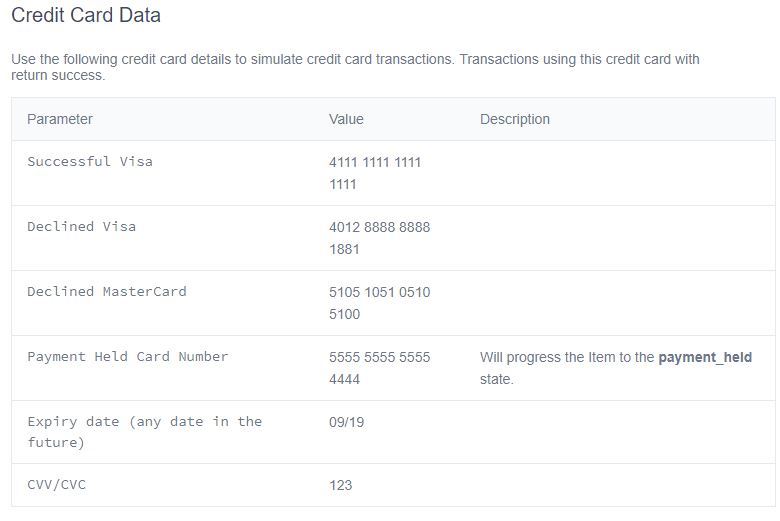
The error is pretty vague, but it does seem that the credit card info they use in the documentation has expired. I tested with another credit card and it went through:

                    promisepay.createCardAccount(token, {

                        full_name: "Bella Buyer",
                        number: "4242424242424242",
                        expiry_month: "12",
                        expiry_year: "2021",
                        cvv: "123"
                    }, success, fail)

Naming Issue
You can also hit this if you’ve only provided a first name and no last name. e.g. John instead of John Doe.

You can work around this by entering the first name twice i.e. John John. Seems a little dodgy but it is the official recommendation from Assembly payments: https://docs.assemblypayments.com/en/articles/2037287-error-error-adding-card-if-this-error-persists-please-contact-our-support-team

Official card details
I was talking to support about another issue and they mentioned the following page: https://reference.assemblypayments.com/#credit-card-data

Tab Key not Working as Expected – Visual Code

Hi everyone,

I ran into a bit of a strange issue with visual code today. Tabs suddenly stopped working for creating an indent. Instead, the focus of the cursor changed.

It turns out that I’d inadvertently toggled a setting that causes the tab key to move focus instead of indenting. The hotkey in windows is ctrl + m.

Thanks to this link for the find: https://github.com/Microsoft/vscode/issues/21638

Including an Externally Hosted Script in ReactJs

Hi everyone,

Just a quick example of how to include an externally hosted js file in a reactjs app. In index.html add your script tag as you would in a normal app:

  
    https://js.prelive.promisepay.com/PromisePay.js
  

Then in the file you plan to use the library you can add a const and reference it normally:

const promisepay = window.promisepay;

Thanks to this link for the info: https://stackoverflow.com/a/44877953/522859

System.Security.SecurityException Failed to negotiate HTTPS Connection – Fiddler

Hi everyone,

I hit the following error when trying to execute a composed request with Fiddler:

[Fiddler] The connection to ‘abc.com’ failed.
System.Security.SecurityException Failed to negotiate HTTPS connection with server.fiddler.network.https> HTTPS handshake to abc.com (for #32) failed. System.Security.Authentication.AuthenticationException A call to SSPI failed, see inner exception. < The function requested is not supported

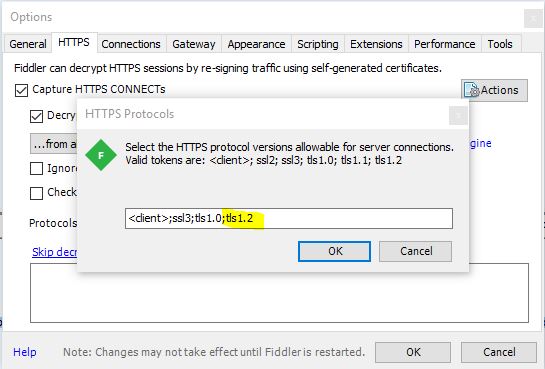
All that was required to fix it was to add tls 1.2:

  • Tools
  • Options
  • HTTPS
  • Protocols
  • Add tls1.2 to the end of the list and click ok

Thanks to this link for the info: https://www.telerik.com/forums/some-https-sites-are-unaccessible-when-using-fiddler

Error Number:8152,State:10,Class:16 String or binary data would be truncated. The statement has been terminated. – Entity Framework

Hi everyone,

I ran into the following error after adding model validation attributes to a database with existing values:

Error Number:8152,State:10,Class:16
String or binary data would be truncated.
The statement has been terminated.

The solution is pretty straightforward if you’re happy to truncate the values. Simply run the query below, swapping Title for your column name, Products for your table name and 25 for your new column length:

UPDATE Products
SET Title = LEFT(Title, 25)
WHERE LEN(Title) > 25

You should then be able to run update-database without any issues:

PM> update-database
Specify the ‘-Verbose’ flag to view the SQL statements being applied to the target database.
Applying explicit migrations: [201806240741543_product_validation].
Applying explicit migration: 201806240741543_product_validation.
Running Seed method.
PM>

Thanks to David in for his answer on Stackoverflow: https://stackoverflow.com/a/24931522/522859

Allow Number and String for PropTypes – ReactJS

Hi everyone,

A quick post on how to allow a string or number when defining PropTypes:

static propTypes = {
        numberField: PropTypes.number.isRequired,
        stringField: PropTypes.number.isRequired,
        mixedField: PropTypes.oneOfType([PropTypes.string, PropTypes.number]).isRequired
    }

Thanks to this stackoverflow post for the info: https://stackoverflow.com/a/41808543/522859

Overriding Button Styles and Hover Effects – Material UI

Hi everyone,

Just a quick post on how to override the background color and hover effects for buttons in material ui:

Define your class as follows:


const styles = theme => ({
    ...
    greenButton: {
        backgroundColor: green[500],
        color: '#FFF',
        '&:hover': {
            backgroundColor: green[400],
            color: '#FFF'
        }
    }

Then just reference it as you normally would:


const styles = theme => ({

const { classes } = this.props;