Paypal Platform Ruby SDK – Adaptive Payments

Hey everyone,

This is the SDK for PayPal adaptive payments. I’ve just uploaded it to *hopefully* make it a little easier to find. Please note that it has not been updated recently and that there are a few changes to be made. The StackOverflow post below provides a few examples:

StackOverflow Post:
Adaptive Payments with Ruby

I’ll try to list any others as I come across them, but if you’ve got some of your own please let me know and I’ll try to keep the post up to date.

Download SDK here:
Paypal Platform SDK


Error #1:

Internal Server Error

undefined method `debug_rjs=' for ActionView::Base:Class

Remove the following line from your development.rb config file:

PayPalPlatformRubySDK::Application.configure do
  # Settings specified here will take precedence over those in config/environment.rb

  # In the development environment your application's code is reloaded on
  # every request.  This slows down response time but is perfect for development
  # since you don't have to restart the webserver when you make code changes.
  config.cache_classes = false

  # Log error messages when you accidentally call methods on nil.
  config.whiny_nils = true

  # Show full error reports and disable caching
  config.consider_all_requests_local       = true
  #config.action_view.debug_rjs             = true <---- Comment this line out (no longer supported)
  config.action_controller.perform_caching = false

  # Don't care if the mailer can't send
  config.action_mailer.raise_delivery_errors = false

  # Print deprecation notices to the Rails logger
  config.active_support.deprecation = :log

  # Only use best-standards-support built into browsers
  config.action_dispatch.best_standards_support = :builtin
end

Paypal IPN History:
For some reason the IPN history button often won’t appear in the sandbox, use the following link to view it:
https://www.sandbox.paypal.com/us/cgi-bin/webscr?cmd=_display-ipns-history

IPN Notifications:
Just a warning for anyone else setting up payments with PayPal, the sandbox IPN is extremely flaky. It has gone down twice in the last six months for weeks at a time, with no warning or error messages. If you’re not receiving the IPN check out the forums to make sure it’s not down.

has_secure_password error – Ruby on Rails

Ran into the following error while using has_secure_password:

/usr/lib/ruby/gems/1.8/gems/bundler-1.0.21/lib/bundler/rubygems_integration.rb:143:in `gem': bcrypt-ruby is not part of the bundle. Add it to Gemfile. (Gem::LoadError)

Thankfully the error is pretty self explanatory, you simply have to add the gem bcrypt-ruby:

chris@chris-VirtualBox:~/cartsite$ gedit Gemfile
#Add gem to Gemfile
...
gem 'bcrypt-ruby'
...
#Run bundle install
chris@chris-VirtualBox:~/cartsite$ bundle install
Using rake (0.9.2.2) 
Using i18n (0.6.0) 
Using multi_json (1.3.6) 
...
Using uglifier (1.2.4) 
Your bundle is complete! Use `bundle show [gemname]` to see where a bundled gem is installed.

Then you should be right to go, let me know if there are any issues.

sqlite3.h is missing – Ruby on Rails

Just an error I ran into while running bundle install on a new ubuntu virtual:

Gem::Installer::ExtensionBuildError: ERROR: Failed to build gem native extension.

/usr/bin/ruby1.8 extconf.rb 
checking for sqlite3.h... no
sqlite3.h is missing. Try 'port install sqlite3 +universal'
or 'yum install sqlite-devel' and check your shared library search path (the
location where your sqlite3 shared library is located).
*** extconf.rb failed ***
Could not create Makefile due to some reason, probably lack of
necessary libraries and/or headers.  Check the mkmf.log file for more
details.  You may need configuration options.

Provided configuration options:
	--with-opt-dir
	--without-opt-dir
	--with-opt-include
	--without-opt-include=${opt-dir}/include
	--with-opt-lib
	--without-opt-lib=${opt-dir}/lib
	--with-make-prog
	--without-make-prog
	--srcdir=.
	--curdir
	--ruby=/usr/bin/ruby1.8
	--with-sqlite3-dir
	--without-sqlite3-dir
	--with-sqlite3-include
	--without-sqlite3-include=${sqlite3-dir}/include
	--with-sqlite3-lib
	--without-sqlite3-lib=${sqlite3-dir}/lib
	--enable-local
	--disable-local

To fix it, simply run the following:

sudo apt-get install libsqlite3-dev

Could not find a JavaScript Runtime – Ruby on Rails

Ran into the following issue today starting a new app on a virtual Ubuntu box:

Could not find a JavaScript runtime

Thankfully there’s a quick fix, simply install nodejs:


chris@chris-VirtualBox:~/Desktop$ sudo apt-get install nodejs


Reading package lists... Done
Building dependency tree       
Reading state information... Done
The following packages were automatically installed and are no longer required:
  postgresql-client-8.4 postgresql-8.4
Use 'apt-get autoremove' to remove them.
The following extra packages will be installed:
  libc-ares2 libev4 libv8-3.1.8.22
The following NEW packages will be installed:
  libc-ares2 libev4 libv8-3.1.8.22 nodejs
0 upgraded, 4 newly installed, 0 to remove and 77 not upgraded.
Need to get 1,938 kB of archives.
After this operation, 6,066 kB of additional disk space will be used.
Do you want to continue [Y/n]? y
Get:1 http://au.archive.ubuntu.com/ubuntu/ oneiric/universe libv8-3.1.8.22 i386 3.1.8.22-1ubuntu2 [1,386 kB]
Get:2 http://au.archive.ubuntu.com/ubuntu/ oneiric/main libc-ares2 i386 1.7.4-1 [37.3 kB]        
Get:3 http://au.archive.ubuntu.com/ubuntu/ oneiric/universe libev4 i386 1:4.04-1 [29.5 kB]       
Get:4 http://au.archive.ubuntu.com/ubuntu/ oneiric/universe nodejs i386 0.4.9-1ubuntu3 [486 kB]  
Fetched 1,938 kB in 18s (106 kB/s)                                                               
Selecting previously deselected package libv8-3.1.8.22.
(Reading database ... 158699 files and directories currently installed.)
Unpacking libv8-3.1.8.22 (from .../libv8-3.1.8.22_3.1.8.22-1ubuntu2_i386.deb) ...
Selecting previously deselected package libc-ares2.
Unpacking libc-ares2 (from .../libc-ares2_1.7.4-1_i386.deb) ...
Selecting previously deselected package libev4.
Unpacking libev4 (from .../libev4_1%3a4.04-1_i386.deb) ...
Selecting previously deselected package nodejs.
Unpacking nodejs (from .../nodejs_0.4.9-1ubuntu3_i386.deb) ...
Processing triggers for doc-base ...
Processing 1 added doc-base file...
Registering documents with scrollkeeper...
Processing triggers for man-db ...
Setting up libv8-3.1.8.22 (3.1.8.22-1ubuntu2) ...
Setting up libc-ares2 (1.7.4-1) ...
Setting up libev4 (1:4.04-1) ...
Setting up nodejs (0.4.9-1ubuntu3) ...
update-alternatives: using /usr/bin/node to provide /usr/bin/js (js) in auto mode.
Processing triggers for libc-bin ...
ldconfig deferred processing now taking place
chris@chris-VirtualBox:~/Desktop$

Let me know if you have any issues.

undefined method `render_with_scope’ (Devise) – Ruby on Rails

I ran into the following error while trying to implement ReCaptcha with devise:

undefined method `render_with_scope' for #

The offending code:

class Users::RegistrationsController < Devise::RegistrationsController
  def create

    #Verify captcha
    if verify_recaptcha
      super
    else
      build_resource
      clean_up_passwords(resource)
      flash.now[:alert] = "There was an error with the recaptcha code below. Please re-enter the code."
      render_with_scope :new
    end
  end
end

This error was caused by the fact that I’d followed an out of date tutorial. Devise no longer uses render_with_scope. Thankfully the solution was pretty straight forward, simply switch render_with_scope with render:

class Users::RegistrationsController < Devise::RegistrationsController
  def create

    #Verify captcha
    if verify_recaptcha
      super
    else
      build_resource
      clean_up_passwords(resource)
      flash.now[:alert] = "There was an error with the recaptcha code below. Please re-enter the code."
      render :new
    end
  end
end

There’s a brief explanation available at the following link: http://groups.google.com/group/plataformatec-devise/browse_thread/thread/596381554ba1fb04

POST http://192.168.1.3:3000 406 (Not Acceptable) – AJAX with Ruby on Rails

Just a quick post on an error I ran into today when trying to create an AJAX image upload with Ruby on Rails. When submitting an AJAX form I received the following error:

POST http://192.168.1.3:3000/uploads 406 (Not Acceptable)

It turns out that there is a fairly simple (and admittedly obvious) solution. Ensure that your controller has an appropriate response for JavaScript files:

i.e.
Form:

{:multipart => true}, :remote => 'true') do |f| %>


prohibited this image from being saved:

  • 'button' %>
    @upload.product_id %>

    Form JavaScript:

    /* Wait for document to load */
    $(document).ready(function() {
        create_ajax_form('new_upload');
    })
    
    /* Create an ajax form */
    function create_ajax_form(form_id){
    
       //Handle ajax submission
       $j('#' + form_id).submit(function(){
    
           //Send for data
           $j.post($j(this).attr("action"), $j(this).serialize(), null, "script");
    
           //Return false
           return false;
       });
    }
    

    Controller Action:

    #Create an upload
      def create
    
        #Create vars
        @upload = Upload.new(params[:upload])
    
        #Create responses
        respond_to do |format|
          if @upload.save
    
            #Retrieve product
            @product = Product.find_by_id(@upload.product_id)
    
            #Create success responses
            format.html { redirect_to @product, :notice => 'Image Added Successfully!'}
            format.js
          else
    
            #Create error responses
            format.html { render :action => 'new'}
            format.js
          end
        end
      end
    

    JavaScript Response:

    alert('test');
    

    Modal Popup – Twitter Bootstrap

    Just a quick post on how to create a modal popup using twitter bootstrap:

    Step #1:

    Add the following to a page element such as a link or button in order to open the modal:

         href="modal_content_name"
         data-toggle="modal"
    

    i.e.

    Add Image
    

    Step #2:
    Create a content div i.e.


    And that’s all there is to it, just make sure you’ve included the bootstrap-modal.js file.

    Modal Popup - Twitter Bootstrap
    Modal Popup - Twitter Bootstrap

    Open Twitter Bootstrap Modal Popup on Page Load:
    In order to open the modal dialog on page load simply add the following JavaScript:

    
        $(document).ready(function(){
            $('#test_modal').modal('show');
        });


    You can also close the modal popup manually by using the following JavaScript:

    
    $('#test_modal').modal('hide')


    Adjust Modal Width:
    In order to adjust the modal width you have two options, Javascript or CSS. You can use the following JavaScript mentioned on GitHub:

    
       $('#test_modal').modal({
            backdrop: true,
            keyboard: true,
            show: false \remove this if you don't want it to show straight away
        }).css({
            width: 'auto',
            'margin-left': function () {
                return -($(this).width() / 2);
            }
        });


    Or this CSS from StackOverflow:

    body .modal-admin {
        //new custom width
        width: 750px;
        //must be half of the width, minus scrollbar on the left (30px)
        margin: -345px 0 0 -375px;
    }
    

    Show modal when the user scrolls past certain div
    I’ve received another request on how to show the modal when a user scrolls to a certain div. The following should work, but please let me know if you have any issues.

    /* Wait for document to load */
    $(document).ready(function(){
    
    $(window).scroll(function(){
    
    //Retrieve scroll distance from top
    var top = $(window).scrollTop();
    
    //Retrieve the divs distance from top of page
    var div_distance = $('my_div').offset().top;
    
    //Use this if you want a bit of a variable distance, for instance if they scroll 150 pixels past the div
    var buffer_distance = 150;
    
    //Check if scrolled past div
    if(top >= div_distance && top <= (div_distance + buffer_distance)){
    
    //Show modal - you may want to add checks etc to see if it's already show
    $('#test_modal').modal('show');
    
    } else {
    
    //Hide the modal, have scrolled past - you may want to add some checks to see if it's already hidden etc
    $('#test_modal').modal('hide');                         
    }        
    }); 
    });


    Popover Function – Twitter Bootstrap

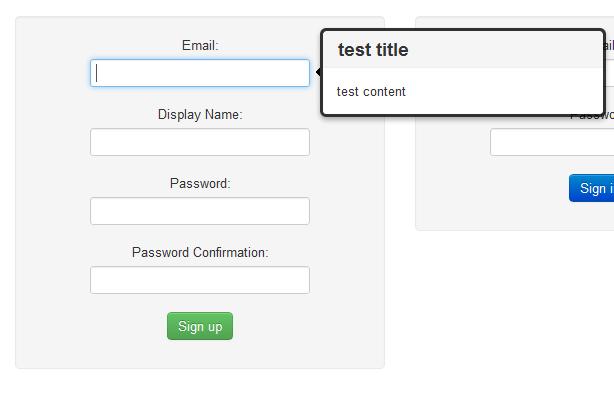
    Just a quick post on how easy it is to implement a popover with twitter bootsrap:

    JavaScript:

    //Create tooltips for login/signup forms
    function create_tooltips(){
    
        //Create vars
        var titles = ['test title']
        var contents = ['test content'];
        var fields = ['#user_email'];
    
        //Loop through each field and assign tooltip
        for(var i = 0; i < fields.length; i++){
    
            //Create vars
            var field = $(fields[i]);
            var title = titles[i];
            var content = contents[i];
    
            //Ensure field found
            if(field){
    
                //Create popover
                $(field).popover(
                    {
                        animation: true,
                        placement: 'right',
                        selector: false,
                        trigger: 'hover',
                        title: title,
                        content: content,
                        delay: 0
                    });
            }
        }
    }
    

    Form:

      
    resource_name, :url => registration_path(resource_name), :class => 'form-vertical') do |f| %>
    'btn btn-success' %>

    Result:

    Popover - Twitter Bootstrap
    Popover - Twitter Bootstrap

    That’s all there is to it, if you haven’t had a chance to check it out yet make sure you head on over to the official site – there are some pretty neat features.

    Allow HTML String – Ruby on Rails

    Just a quick post on how to prevent escaping for HTML within a string. Simply use html_safe?.

    i.e. The following will show the bold tags as text:

    <%= "GOOOOOOOGLE">
    

    <b>GOOOOOOOGLE</b>

    Whereas once we add html_safe the text will be displayed in bold:

    <%= ("GOOOOOOOGLE").html_safe?>
    

    GOOOOOOOGLE