I’m currently installing ros2 on Ubuntu (with Parallels) and ran into the following error:
Hit:1 http://au.ports.ubuntu.com/ubuntu-ports jammy InRelease
Hit:2 http://ports.ubuntu.com/ubuntu-ports jammy-security InRelease
Get:3 http://packages.ros.org/ros2/ubuntu jammy InRelease [4,673 B]
Hit:4 http://au.ports.ubuntu.com/ubuntu-ports jammy-updates InRelease
Err:3 http://packages.ros.org/ros2/ubuntu jammy InRelease
The following signatures couldn't be verified because the public key is not available: NO_PUBKEY F42ED6FBAB17C654
Get:5 http://ports.ubuntu.com/ubuntu-ports jammy-proposed InRelease [270 kB]
Hit:6 http://au.ports.ubuntu.com/ubuntu-ports jammy-backports InRelease
Reading package lists… Done
W: GPG error: http://packages.ros.org/ros2/ubuntu jammy InRelease: The following signatures couldn't be verified because the public key is not available: NO_PUBKEY F42ED6FBAB17C654
E: The repository 'http://packages.ros.org/ros2/ubuntu jammy InRelease' is not signed.
N: Updating from such a repository can't be done securely, and is therefore disabled by default.
N: See apt-secure(8) manpage for repository creation and user configuration details.
I was following the official tutorial so I was little surprised to see this crop up. What I hadn’t realised was that I’d missed an error in the output dump while running sudo apt update:
chris@chris-parallels-ubuntu:~$ sudo apt update && sudo apt install curl gnupg lsb-release
sudo curl -sSL https://raw.githubusercontent.com/ros/rosdistro/master/ros.key -o /usr/share/keyrings/ros-archive-keyring.gpg
Hit:1 http://au.ports.ubuntu.com/ubuntu-ports jammy InRelease
Hit:2 http://ports.ubuntu.com/ubuntu-ports jammy-security InRelease
Get:3 http://packages.ros.org/ros2/ubuntu jammy InRelease [4,673 B]
Err:3 http://packages.ros.org/ros2/ubuntu jammy InRelease
The following signatures couldn't be verified because the public key is not available: NO_PUBKEY F42ED6FBAB17C654
Hit:4 http://au.ports.ubuntu.com/ubuntu-ports jammy-updates InRelease
Hit:5 http://ports.ubuntu.com/ubuntu-ports jammy-proposed InRelease
Hit:6 http://au.ports.ubuntu.com/ubuntu-ports jammy-backports InRelease
Reading package lists… Done
W: GPG error: http://packages.ros.org/ros2/ubuntu jammy InRelease: The following signatures couldn't be verified because the public key is not available: NO_PUBKEY F42ED6FBAB17C654
E: The repository 'http://packages.ros.org/ros2/ubuntu jammy InRelease' is not signed.
N: Updating from such a repository can't be done securely, and is therefore disabled by default.
N: See apt-secure(8) manpage for repository creation and user configuration details.
sudo: curl: command not found
This was a clean install of Ubuntu and I hadn’t yet installed curl. Luckily, this is a simple fix:
If you’re like me and a bit slack with your personal projects you might’ve started receiving the following error today:
admin@Admins-iMac ui % git push
remote: Support for password authentication was removed on August 13, 2021. Please use a personal access token instead.
remote: Please see https://github.blog/2020-12-15-token-authentication-requirements-for-git-operations/ for more information.
fatal: unable to access 'https://github.com/Buzzology/referrer.git/': The requested URL returned error: 403
As the message says, Github wants you to start using a Personal Access Token (PAT) instead of password authentication. Luckily, the fix is pretty straight forward – you’ll need to create a Personal Access Token and then update your keychain.
Once you’re on the Personal Access Tokens page you should see something like the following:
Click the Generate new token button, set an expiry and then copy the generated value (you’ll need it in the next step).
Step #2: Updating your keychain
Now that you’ve got your Personal Access Token you need to replace the password that you’ve currently got stored in your keychain. To start, open search and bring up Keychain Access:
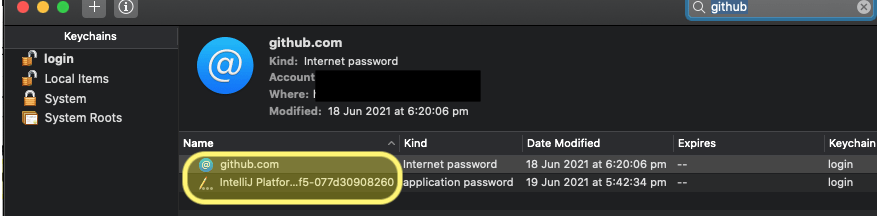
If you’ve got quite a few keys there you can filter them by searching for github. You’ll then need to double click on each of the entries and replace the stored password with your personal access token:
Note that you’ll first need to click Show Password.
Now that your keychain is updated, close and then re-open any of your terminals and you should be good to go.
admin@Admins-iMac ui % git push
Enumerating objects: 110, done.
Counting objects: 100% (110/110), done.
Delta compression using up to 4 threads
Compressing objects: 100% (91/91), done.
Writing objects: 100% (93/93), 15.30 KiB | 2.19 MiB/s, done.
Total 93 (delta 64), reused 0 (delta 0), pack-reused 0
remote: Resolving deltas: 100% (64/64), completed with 14 local objects.
To https://github.com/Buzzology/referrer.git
   0d2ecf0..97f2716  master -> master
admin@Admins-iMac ui %



 What I Broke - Programming and Web Development