angular js calling services twice – Angular JS

Hey everyone,

I had a few of my AngularJS services being called twice. The issue turned out to be that I’d added a controller to both my route and my view:

app.config(function ($routeProvider) {
    $routeProvider
		.when('/', {
		    controller: 'ProjectsController', /* <---- here */
		    templateUrl: '/Home/Home'
		})
    <!--
  • {{project.Name}}

Removing it from the controller resolved the issue. Check out the following StackOverflow post for more info: http://stackoverflow.com/a/15535724/522859

Error: $injector:modulerr Module Error – AngularJS

Hey everyone,

Just getting back into angularjs and I came across the following error:

Unknown provider: $routeProvider

It turns out I that while I had included the route provider file I had missed adding it to the app:


//Original
var app = angular.module('commandsApp', [']);

//Fixed
var app = angular.module('commandsApp', ['ngRoute']);

Check out the following links if you’re still having issues:
http://plnkr.co/edit/zbG9Vycrxk6mmlzwfTRm?p=preview
https://docs.angularjs.org/api/ngRoute/provider/$routeProvider

Dragging a File from File Explorer Causes Google Chrome to Crash

Hey everyone,

A team member found an interesting bug today that caused chrome to go non-responsive. The cause was simply dragging a file from the file explorer onto a drag and drop upload area. It is reproducible on every site I’ve tested, including Gmail and Dropbox.

Reproduce

  • Go to https://mail.google.com
  • Click compose
  • Click attach files (close any of the annoying popups that appear)
  • DRAG a number of files from the file selector window to the new message screen (they will start to upload) (IMPORTANT: these need to be dragged from the file selector popup, NOT a new explorer window)
  • While they are still uploading hit cancel on the file browser window. Browser will go non-responsive

A bug has been reported here: https://code.google.com/p/chromium/issues/detail?id=388661

Refresh a Page with JavaScript

Hey everyone,

Just a quick post on how to force a page refresh with JavaScript (no jQuery required):

location.reload();

Note that the reload function accepts a boolean parameter that can be used for force a server refresh. Alternatively, it just defaults to the cache.

Checkout this Stackoverflow post for more info: http://stackoverflow.com/a/5404869/522859

Detecting FileSize – jQuery

Hey everyone,

Just a quick post on how to detect a file’s size with jQuery. I’m currently using a version of this for basic client side validation:


    Upload image:
    

$(document).ready(function(){
    $('#image-file').bind('change', function() {
        
        var fileSize = this.files && this.files.length > 0 && this.files[0].size ? this.files[0].size / 1024 / 1024 : 0;
        
        if(fileSize > 0){
            $('body').append('
' + fileSize + ' MB
'); } else{ $('body').append('
' + fileSize + ' MB
'); } }); });
.file{
padding: 5px 7px;
border-radius: 3px;
background-color: green;
color: white;
margin: 5px;
}

.file.valid{
background-color: rgb(127, 197, 127);
}

.file.invalid{
background-color: rgb(197, 127, 127);
}

Here’s the link to the full fiddle: http://jsfiddle.net/nLLMF/

There’re also a whole heap of other options listed on this StackOverflow post if you’re chasing something a bit more robust: http://stackoverflow.com/a/13249924/522859

http://jsfiddle.net/nLLMF/embedded/

Rails Flash Messages in MVC4

Hey everyone,

Coming from Rails I’d grown quite fond of flash messages. Unfortunately there isn’t a built in way of doing this in MVC4. Luckily, there’s a five minute solution posted on StackOverflow: http://stackoverflow.com/a/11809178/522859

Once implemented, it works just like in Rails:

this.Flash("We need you to login before you can edit anything.", FlashEnum.Warning);

Definitely worth checking out if you’ve got time, even more so if you’ve come over from Rails!

Twitter Bootstrap – Carousel Only CSS

Hey everyone,

I ran into a bit of an issue today with my stylesheet conflicting with Bootstrap. After a bit of tinkering I realised that all I really needed from bootstrap were the Carousel styles. I’ve taken everything else out and included everything that’s left below:

.carousel {
  position: relative;
}
.carousel-inner {
  position: relative;
  overflow: hidden;
  width: 100%;
}
.carousel-inner > .item {
  display: none;
  position: relative;
  -webkit-transition: 0.6s ease-in-out left;
  transition: 0.6s ease-in-out left;
}
.carousel-inner > .item > img,
.carousel-inner > .item > a > img {
  line-height: 1;
}
.carousel-inner > .active,
.carousel-inner > .next,
.carousel-inner > .prev {
  display: block;
}
.carousel-inner > .active {
  left: 0;
}
.carousel-inner > .next,
.carousel-inner > .prev {
  position: absolute;
  top: 0;
  width: 100%;
}
.carousel-inner > .next {
  left: 100%;
}
.carousel-inner > .prev {
  left: -100%;
}
.carousel-inner > .next.left,
.carousel-inner > .prev.right {
  left: 0;
}
.carousel-inner > .active.left {
  left: -100%;
}
.carousel-inner > .active.right {
  left: 100%;
}
.carousel-control {
  position: absolute;
  top: 0;
  left: 0;
  bottom: 0;
  width: 15%;
  opacity: .5;
  filter: alpha(opacity=50);
  font-size: 20px;
  color: #fff;
  text-align: center;
  text-shadow: 0 1px 2px rgba(0, 0, 0, 0.6);
}
.carousel-control.left {
  background-image: -webkit-linear-gradient(left, color-stop(rgba(0, 0, 0, 0.5) 0), color-stop(rgba(0, 0, 0, 0.0001) 100%));
  background-image: linear-gradient(to right, rgba(0, 0, 0, 0.5) 0, rgba(0, 0, 0, 0.0001) 100%);
  background-repeat: repeat-x;
  filter: progid:DXImageTransform.Microsoft.gradient(startColorstr='#80000000', endColorstr='#00000000', GradientType=1);
}
.carousel-control.right {
  left: auto;
  right: 0;
  background-image: -webkit-linear-gradient(left, color-stop(rgba(0, 0, 0, 0.0001) 0), color-stop(rgba(0, 0, 0, 0.5) 100%));
  background-image: linear-gradient(to right, rgba(0, 0, 0, 0.0001) 0, rgba(0, 0, 0, 0.5) 100%);
  background-repeat: repeat-x;
  filter: progid:DXImageTransform.Microsoft.gradient(startColorstr='#00000000', endColorstr='#80000000', GradientType=1);
}
.carousel-control:hover,
.carousel-control:focus {
  outline: none;
  color: #fff;
  text-decoration: none;
  opacity: .9;
  filter: alpha(opacity=90);
}
.carousel-control .icon-prev,
.carousel-control .icon-next,
.carousel-control .glyphicon-chevron-left,
.carousel-control .glyphicon-chevron-right {
  position: absolute;
  top: 50%;
  z-index: 5;
  display: inline-block;
}
.carousel-control .icon-prev,
.carousel-control .glyphicon-chevron-left {
  left: 50%;
}
.carousel-control .icon-next,
.carousel-control .glyphicon-chevron-right {
  right: 50%;
}
.carousel-control .icon-prev,
.carousel-control .icon-next {
  width: 20px;
  height: 20px;
  margin-top: -10px;
  margin-left: -10px;
  font-family: serif;
}
.carousel-control .icon-prev:before {
  content: '2039';
}
.carousel-control .icon-next:before {
  content: '203a';
}
.carousel-indicators {
  position: absolute;
  bottom: 10px;
  left: 50%;
  z-index: 15;
  width: 60%;
  margin-left: -30%;
  padding-left: 0;
  list-style: none;
  text-align: center;
}
.carousel-indicators li {
  display: inline-block;
  width: 10px;
  height: 10px;
  margin: 1px;
  text-indent: -999px;
  border: 1px solid #fff;
  border-radius: 10px;
  cursor: pointer;
  background-color: #000 9;
  background-color: rgba(0, 0, 0, 0);
}
.carousel-indicators .active {
  margin: 0;
  width: 12px;
  height: 12px;
  background-color: #ffffff;
}
.carousel-caption {
  position: absolute;
  left: 15%;
  right: 15%;
  bottom: 20px;
  z-index: 10;
  padding-top: 20px;
  padding-bottom: 20px;
  color: #fff;
  text-align: center;
  text-shadow: 0 1px 2px rgba(0, 0, 0, 0.6);
}
.carousel-caption .btn {
  text-shadow: none;
}
@media screen and (min-width: 768px) {
  .carousel-control .glyphicon-chevron-left,
  .carousel-control .glyphicon-chevron-right,
  .carousel-control .icon-prev,
  .carousel-control .icon-next {
    width: 30px;
    height: 30px;
    margin-top: -15px;
    margin-left: -15px;
    font-size: 30px;
  }
  .carousel-caption {
    left: 20%;
    right: 20%;
    padding-bottom: 30px;
  }
  .carousel-indicators {
    bottom: 20px;
  }
}

Minified:

.carousel{position:relative}.carousel-inner{position:relative;overflow:hidden;width:100%}.carousel-inner>.item{display:none;position:relative;-webkit-transition:.6s ease-in-out left;transition:.6s ease-in-out left}.carousel-inner>.item>a>img,.carousel-inner>.item>img{line-height:1}.carousel-inner>.active,.carousel-inner>.next,.carousel-inner>.prev{display:block}.carousel-inner>.active{left:0}.carousel-inner>.next,.carousel-inner>.prev{position:absolute;top:0;width:100%}.carousel-inner>.next{left:100%}.carousel-inner>.prev{left:-100%}.carousel-inner>.next.left,.carousel-inner>.prev.right{left:0}.carousel-inner>.active.left{left:-100%}.carousel-inner>.active.right{left:100%}.carousel-control{position:absolute;top:0;left:0;bottom:0;width:15%;opacity:.5;filter:alpha(opacity=50);font-size:20px;color:#fff;text-align:center;text-shadow:0 1px 2px rgba(0,0,0,.6)}.carousel-control.left{background-image:-webkit-linear-gradient(left,color-stop(rgba(0,0,0,.5)0),color-stop(rgba(0,0,0,.0001)100%));background-image:linear-gradient(to right,rgba(0,0,0,.5)0,rgba(0,0,0,.0001)100%);background-repeat:repeat-x;filter:progid:DXImageTransform.Microsoft.gradient(startColorstr='#80000000', endColorstr='#00000000', GradientType=1)}.carousel-control.right{left:auto;right:0;background-image:-webkit-linear-gradient(left,color-stop(rgba(0,0,0,.0001)0),color-stop(rgba(0,0,0,.5)100%));background-image:linear-gradient(to right,rgba(0,0,0,.0001)0,rgba(0,0,0,.5)100%);background-repeat:repeat-x;filter:progid:DXImageTransform.Microsoft.gradient(startColorstr='#00000000', endColorstr='#80000000', GradientType=1)}.carousel-control:focus,.carousel-control:hover{outline:0;color:#fff;text-decoration:none;opacity:.9;filter:alpha(opacity=90)}.carousel-control .glyphicon-chevron-left,.carousel-control .glyphicon-chevron-right,.carousel-control .icon-next,.carousel-control .icon-prev{position:absolute;top:50%;z-index:5;display:inline-block}.carousel-control .glyphicon-chevron-left,.carousel-control .icon-prev{left:50%}.carousel-control .glyphicon-chevron-right,.carousel-control .icon-next{right:50%}.carousel-control .icon-next,.carousel-control .icon-prev{width:20px;height:20px;margin-top:-10px;margin-left:-10px;font-family:serif}.carousel-control .icon-prev:before{content:'2039'}.carousel-control .icon-next:before{content:'203a'}.carousel-indicators{position:absolute;bottom:10px;left:50%;z-index:15;width:60%;margin-left:-30%;padding-left:0;list-style:none;text-align:center}.carousel-indicators li{display:inline-block;width:10px;height:10px;margin:1px;text-indent:-999px;border:1px solid #fff;border-radius:10px;cursor:pointer;background-color:#000 9;background-color:rgba(0,0,0,0)}.carousel-indicators .active{margin:0;width:12px;height:12px;background-color:#fff}.carousel-caption{position:absolute;left:15%;right:15%;bottom:20px;z-index:10;padding-top:20px;padding-bottom:20px;color:#fff;text-align:center;text-shadow:0 1px 2px rgba(0,0,0,.6)}.carousel-caption .btn{text-shadow:none}@media screen and (min-width:768px){.carousel-control .glyphicon-chevron-left,.carousel-control .glyphicon-chevron-right,.carousel-control .icon-next,.carousel-control .icon-prev{width:30px;height:30px;margin-top:-15px;margin-left:-15px;font-size:30px}.carousel-caption{left:20%;right:20%;padding-bottom:30px}.carousel-indicators{bottom:20px}}

Let me know if you have any other issues.
How to Get a JavaScript Stack Trace – Chrome Console

Hey everyone,

Just a quick post on something useful I came across today. In JavaScript you can access the stack trace via console using the following command (ctrl + shift + j):

console.trace()

In Chrome, this will let you navigate to each relevant call by clicking the line number in the console window. I’ve found it pretty useful for backtracking through jQuery exceptions.

For more info, check out this Stackoverflow post: http://stackoverflow.com/q/6715571/522859

Chrome Replacing Strings with Ellipses – Chrome Console

Hey everyone,

Ran into a bit of an issue today where a url was being shortened in Chrome’s console. It turns out that there’s a quick command you can use to copy the full value:

copy(myVariable)

Type copy into the console window and pass the variable you want to copy as a parameter. This will then be saved to your clipboard for pasting.

Check out this Stackoverflow post for more info: http://stackoverflow.com/a/19184513/522859

Random Class Directive – AngularJS

Hey everyone,

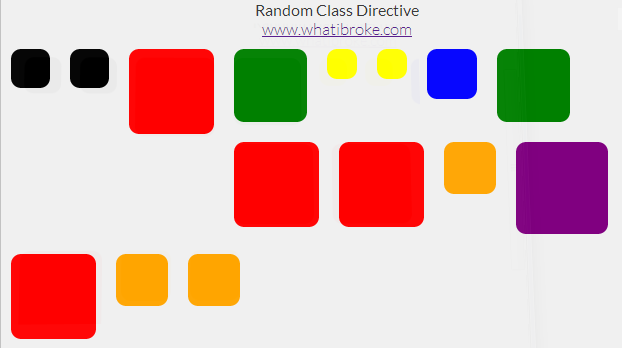
Just another small directive. This one adds a random class from the provided array to the element.

Check out this fiddle to see the demo: http://jsfiddle.net/uvSVj/3/

Random Background Directive

I used this directive to add a random background to each of my wrapper divs:

Random Background Real World Usage

To use it in your app simply define a list of classes in your controller:

app.controller("MyCtrl", function MyCtrl($scope) {
    
    /* A random class is picked from this list */
    $scope.classes = [
        //"bg-buildings",
        "red",
        "blue",
        "yellow",
        "green",
        "orange",
        "black",
        "purple"
    ];        
});

Then add the directive to your page (can be an existing element):

A random class will then be selected from the list and appended to the elements current list of classes (if any).

The easiest way to see how it’s done is probably just to check out the fiddle above, but there’s a code dump below if you need it:

The Random Class Directive

app.directive("ngRandomClass", function () {
    return {
        restrict: 'EA',
        replace: false,
        scope: {
            ngClasses: "="
        },
        link: function (scope, elem, attr) {            

            //Add random background class to selected element
            elem.addClass(scope.ngClasses[Math.floor(Math.random() * (scope.ngClasses.length))]);
        }
    }
});

Sample Html

Random Class Directive

www.whatibroke.com

Sample JS

/* 
    http://www.whatibroke.com/?p=899
    Adds a random class to element
    Usage: add ng-random-class to element
*/

var app = angular.module('myApp', []);

app.controller("MyCtrl", function MyCtrl($scope) {
    
    /* A random class is picked from this list */
    $scope.classes = [
        //"bg-buildings",
        "red",
        "blue",
        "yellow",
        "green",
        "orange",
        "black",
        "purple"
    ];        
});

Sample Styles

/* Just a demo div */
.test{
    width: 50px;
    height: 50px;
    margin: 10px;
    padding: 5px;
    float: left;   
    -webkit-transition: 400ms linear all;
	-moz-transition: 400ms linear all;
	-ms-transition: 400ms linear all;
	-o-transition: 400ms linear all;
	transition: 400ms linear all;
    cursor: pointer;
    border-radius: 10px;    
}

.test:hover{
    opacity: 0.8;    
}

body{
	background-color: #F0F0F0;
	font-family: "Lato", sans-serif;
	font-weight: 300;
	color: #363636;
    text-align: center;
    vertical-align: middle;
}

/* Random classes */
.red {
    background-color: red !important;
    height: 75px;
    width: 75px;
}

.blue {
    background-color: blue !important;
    height: 40px;
    width: 40px;
}

.yellow {
    background-color: yellow !important;
    height: 20px;
    width: 20px;
}

.green {
    background-color: green !important;
    height: 63px;
    width: 63px;
}
.purple {
    background-color: purple !important;
    height: 82px;
    width: 82px;
}
.black {
    background-color: black !important;
    height: 29px;
    width: 29px;
}
.orange {
    background-color: orange !important;
    width: 42px;
    height: 42px;
}

Let me know if you run into any issues and feel free to use/change however you want.