Hey everyone,
Ran into a really obvious mistake today working with an Arduino. Thought I’d corrupted a boot loader and couldn’t get Serial.println to return anything. Turned out I’d just missed Serial.begin(9600).
Thanks!
Hey everyone,
Ran into a really obvious mistake today working with an Arduino. Thought I’d corrupted a boot loader and couldn’t get Serial.println to return anything. Turned out I’d just missed Serial.begin(9600).
Thanks!
Hey everyone,
I ran into a bit of an issue today where I was unable to access my RDS SQL Express instance from my .NET Elastic Beanstalk instance. I was receiving the following error:
The server was not found or was not accessible.
The solution turned out to be fairly simply thanks to this StackOverflow post: http://stackoverflow.com/a/33207022/522859
Get your server instance security group:
– Log into AWS
– Navigate to elastic beanstalk
– Open your application instance
– Open configuration
– Open instances
– Find “server” on the page and copy the value in the “EC2 security groups” field
Add your server instance security group to your rds rules:
– Navigate to the RDS Dashboard
– Open your RDS instance
– Click on view details (left hand side or top)
– Find Security and Network
– Click on the rds-launch-wizard under security groups
– Click on inbound rules (very bottom currently)
– Add a new inbound rule with the copied security group as the source
Hey everyone,
Just an error I ran into today while using the Adaptive Payments SDK for C#/.NET:
Thankfully this one is fairly simple – one of the receivers hasn’t confirmed their account.
Hey everyone,
I ran into the following error when I tried to add a new Web API project in Visual Studio Express 2015 for Web:
The workaround for this was to temporarily unbind the project from TFS: File > Source Control > Advanced > Change Source Control > Click unbind on each of the projects
While not the same problem, this post helped me out: https://github.com/NuGet/Home/issues/1164
Hey everyone,
Just another Adaptive Payments SDK error I’ve run into.
This one is fairly self explanatory, valid values are as follows:
SENDER – Sender pays all fees (for personal, implicit simple/parallel payments; do not use for chained or unilateral payments)
PRIMARYRECEIVER – Primary receiver pays all fees (chained payments only)
EACHRECEIVER – Each receiver pays their own fee (default, personal and unilateral payments)
SECONDARYONLY – Secondary receivers pay all fees (use only for chained payments with one secondary receiver)
This parameter is described in the following documentation: https://developer.paypal.com/docs/classic/api/adaptive-payments/Pay_API_Operation/
Hey everyone,
I had a bit of trouble getting a selected option to show up with AngularJs. It turned out that I needed to add an ng-selected attribute:
    {{command.Status}}

        Enabled
        Disabled
        Deleted
Check out this Stackoverflow post for more info: http://stackoverflow.com/a/18336858/522859
Hey everyone,
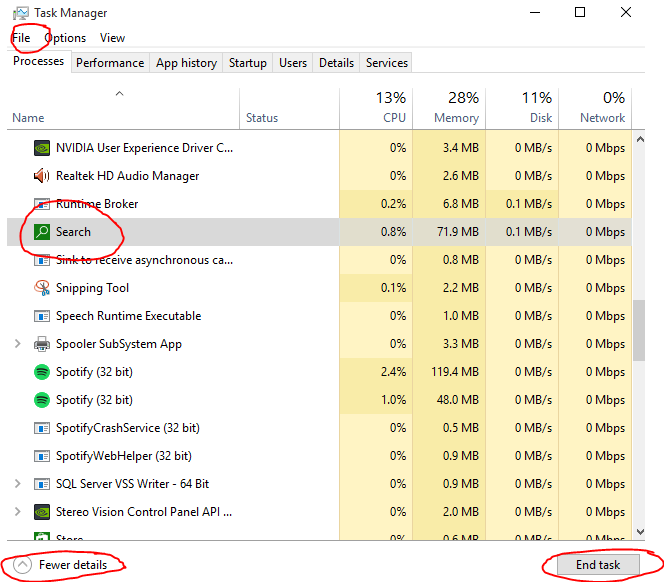
I’ve just upgraded to windows 10, however the start menu search has been randomly breaking. It just seems to load indefinitely. Thankfully there’s an easy fix:
- Start task manager (ctrl + shift + esc)
- Click more details
- Under the processes heading look for Search (green icon under background processes)
- Click on Search and hit end task
The Search process should now restart and start working. If not you can restart it manually using file > run.
Hey everyone,
I had a few of my AngularJS services being called twice. The issue turned out to be that I’d added a controller to both my route and my view:
app.config(function ($routeProvider) {
    $routeProvider
		.when('/', {
		    controller: 'ProjectsController', /* <---- here */
		    templateUrl: '/Home/Home'
		})
<!--
- {{project.Name}}
Removing it from the controller resolved the issue. Check out the following StackOverflow post for more info: http://stackoverflow.com/a/15535724/522859
Hey everyone,
Just getting back into angularjs and I came across the following error:
It turns out I that while I had included the route provider file I had missed adding it to the app:
//Original
var app = angular.module('commandsApp', [']);

//Fixed
var app = angular.module('commandsApp', ['ngRoute']);
Check out the following links if you’re still having issues:
http://plnkr.co/edit/zbG9Vycrxk6mmlzwfTRm?p=preview
https://docs.angularjs.org/api/ngRoute/provider/$routeProvider
Hey everyone,
I ran into the following issue while trying to install the HTML Agility Pack via Nuget today:
This fixed it for me:
– Go to “Team Explorer”
– Up the very top click on the “Connect to Team Projects” button (power cable looking icon next to the home button)
– Right click on the project and then click connect
Once connected, everything seemed to start working for me again. Check out this stackoverflow post more info: http://stackoverflow.com/a/16700451/522859
 What I Broke - Programming and Web Development