NetTopologySuite Circular Reference with .net core 2.2

Hey everyone,

Testing out a spatial project with .net core and I ran into the following error:

Microsoft.CSharp.RuntimeBinder.RuntimeBinderException : The best overloaded method match for ‘Xunit.Assert.Equal(string, string)’ has some invalid arguments

at CallSite.Target(Closure , CallSite , Type , Nullable`1 , Object )
at UpdateDelegates.UpdateAndExecuteVoid3[T0,T1,T2](CallSite site, T0 arg0, T1 arg1, T2 arg2)
at DiscussionsControllerIntegrationTests.CreateTestDiscussion(HttpClient client, ApplicationDbContext db, DiscussionCreateWebRequest payload) in DiscussionsControllerIntegrationTests.cs line: 56
at DiscussionsControllerIntegrationTests.b__1_0(ApplicationDbContext db) in DiscussionsControllerIntegrationTests.cs line: 27
at IntegrationTestBase.RunTest(Func`2 testToExecute) in IntegrationTestBase.cs line: 54
at DiscussionsControllerIntegrationTests.CreateDiscussionIsSuccessful() in DiscussionsControllerIntegrationTests.cs line: 25
at — End of stack trace from previous location where exception was thrown —

Thankfully the solution is pretty straight forward. Install GeoJSON:

Install-Package NetTopologySuite.IO.GeoJSON

Then merge the following with your existing addMvc call in startup.cs:

services.AddMvc(options =>
            {
                // Prevent the following exception: 'This method does not support GeometryCollection arguments'
                // See: https://github.com/npgsql/Npgsql.EntityFrameworkCore.PostgreSQL/issues/585
                options.ModelMetadataDetailsProviders.Add(new SuppressChildValidationMetadataProvider(typeof(Point)));
                options.ModelMetadataDetailsProviders.Add(new SuppressChildValidationMetadataProvider(typeof(Coordinate)));
                options.ModelMetadataDetailsProviders.Add(new SuppressChildValidationMetadataProvider(typeof(LineString)));
                options.ModelMetadataDetailsProviders.Add(new SuppressChildValidationMetadataProvider(typeof(MultiLineString)));
            })
                .AddJsonOptions(options =>
                {
                    foreach (var converter in NetTopologySuite.IO.GeoJsonSerializer.Create(new GeometryFactory(new PrecisionModel(), 4326)).Converters)
                    {
                        options.SerializerSettings.Converters.Add(converter);
                    }
                })
                .SetCompatibilityVersion(CompatibilityVersion.Version_2_2);

Set Date Back Twelve Hours – MSSQL

Hey everyone,

A quick post on how to set a date value for twelve hours ago using SQL Server:

UPDATE MyTable
SET MyDate = dateadd(HOUR, -12, CURRENT_TIMESTAMP)

Simply use the dateadd function and specify the unit (hours in this case). The example above will set MyDate to twelve hours ago.

Here’s the offical documentation on the function: https://docs.microsoft.com/en-us/sql/t-sql/functions/dateadd-transact-sql?view=sql-server-2017

Also, thanks to this stackoverflow post for the info: https://stackoverflow.com/a/18518412/522859

Unable to Migrate after Adding Config to Startup

Hi everyone,

Just a quick post on fixing up a migration error after I added new config to startup.cs via DI. The error after running add-migration was pretty unintuitive:

Unable to create an object of type 'ApplicationDbContext'. For the different patterns supported at design time, see https://go.microsoft.com/fwlink/?linkid=851728

To find out a bit more I ran the following:

add-migration -verbose

This revealed the fact that there was an issue with adding my config line. The error stated that I had to have an empty constructor which led me on a bit of a wild goose chase.

The solution was simply a missed entry in application.json. In my case it was an omitted “assembly” section. Having said that, I did come across a few instances where people had the same problem when omitting commas etc.

Hopefully that’s able to get you on the right track!

Thanks,
Chris

Typography Component without a Line Break – Material-UI

Hey everyone,

UPDATE:
In new versions you now need to add a display attribute: display=”inline”

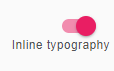
I’ve been working with Material-UI and ReactJS and had a bit of an issue with a Typography component generating an unwanted link break:

download (1)

To fix it, all I needed was the inline attribute. Once added the text appeared next to the form element instead of below:
Capture
download (3)

Unable to find a dom node for 19 – Slate.js

Hi everyone,

I ran into the following error while attempting to add an image to a slate.js editor today:

slate.js unable to find dom node for 19

The solution was to add a simple schema to my editor:


const schema = {
    blocks: {
        image: {
            isVoid: true
        }
    }
};
    spellCheck
    autoFocus
    ref={this.ref}
    value={this.state.value}
    onChange={this.onChange}
    onKeyDown={this.onKeyDown}
    onDrop={this.onDropOrPaste}
    onPaste={this.onDropOrPaste}
    renderNode={this.renderNode}
    renderMark={this.renderMark}
    className={classes.editor}
    readOnly={readOnly}
    onFocus={() => { this.setState({ changed: true }); }}
    schema={schema}

There’s more on schemas in the official documentation: https://docs.slatejs.org/guides/schemas

String to Color – Avatar Helpers

Hi everyone,

A quick post on a helper function I came across for generating avatars. This function generates a random color for the specified string:


export const stringToColor = string => {

let hash = 0;
let i;

for (i = 0; i < string.length; i += 1) {
hash = string.charCodeAt(i) + ((hash << 5) - hash);
}

let colour = '#';

for (i = 0; i > (i * 8)) & 0xff;
colour += `00${value.toString(16)}`.substr(-2);
}

return colour;
}

Thanks to oliviertassinari: https://github.com/oliviertassinari/SplitMe/blob/c25fe62187a856386fd0c43c51859d6f973d651e/src/main/member/Avatar.js#L8-L26

Access to fetch from origin has been blocked by CORS policy – AWS SAM Local

Hi everyone,

I’ve been using AWS SAM local lately and ran into a bit of an issue with CORS. It took a looong time to find a solution that worked for all of my local scenarios so hopefully this will be able to help someone else out.

Access to fetch at 'http://127.0.0.1:3000' from origin 'http://localhost:3001' has been blocked by CORS policy: Response to preflight request doesn't pass access control check: No 'Access-Control-Allow-Origin' header is present on the requested resource. If an opaque response serves your needs, set the request's mode to 'no-cors' to fetch the resource with CORS disabled.

The error above is fairly typical when working with APIs. The request will work from tools such as postman and fiddler but browsers will block it. These are a few good links that explain why CORS is necessary:
https://medium.com/@electra_chong/what-is-cors-what-is-it-used-for-308cafa4df1a
https://stackoverflow.com/a/29167709/522859

As for the solution, add the following to your template.yml:

  PreFlightFunction:
    Type: AWS::Serverless::Function
    Properties:
      Handler: functions/generic/cors.getPreflightHandler
      Runtime: nodejs8.10
      Events:
        GetEvent:
          Type: Api
          Properties:
            Path: /pages
            Method: options
            RestApiId: !Ref XXXApi
            Auth:
              Authorizer: NONE

If you haven’t already defined your api in your template.yml file there is a default/omitted one created for you. There are a few examples on the AWS github: https://github.com/awslabs/serverless-application-model/blob/release/v1.8.0/examples/2016-10-31/api_cognito_auth/template.yaml

The next thing to do is to create a handler for the options request:


/* Handles retrieving a specific page */
exports.getPreflightHandler = async (event, context, callback) => {
    callback(null, { body: {} }, headers: { 'content-type': 'application/json', 'Access-Control-Allow-Origin': '*', 'Access-Control-Allow-Headers': 'Content-Type,X-Amz-Date,Authorization,X-Api-Key,X-Amz-Security-Token', 'Access-Control-Allow-Methods': 'OPTIONS,GET,POST,PUT,PATCH,DELETE', 'Access-Control-Allow-Credentials': true }, statusCode: 200 })
};

I’ve moved all mine out to some helper methods but the above should be enough to get it working for you. Hopefully the AWS team will have a simpler solution soon but if you run into any issues in the meantime please let me know!

AWS SAM Request Extremely Slow – Fix

Hi everyone,

I’m currently using AWS SAM CLI with NodeJS and was surprised to find that the requests were significantly slower when run locally. Luckily, I came across a post that suggested adding –skip-pull-image to your start-api command:

sam local start-api --skip-pull-image

This brought my requests down to under a second. Thanks to the following link for the info: https://github.com/awslabs/aws-sam-cli/issues/134#issuecomment-406786704

this.query is not a function – error when using promisify with mysql

Hi everyone,

I ran into the following error while attempting to promisify my node.js mysql transactions:

TypeError: this.query is not a function
    at rollback (/var/task/node_modules/mysql/lib/Connection.js:179:15)
    at rollback (internal/util.js:230:26)

This took a while to track down but it turns out that I needed to bind the connection after promisifying the function. Instead of:

util.promisify(connection.query);

Add bind to the end of it:

util.promisify(connection.query).bind(connection)

Thanks to the following stackoverflow post for the insight: https://stackoverflow.com/a/51690276/522859

Overriding Global Variables – AWS SAM Local

Hi everyone,

Today I’ve added local overrides to the global variables in my template.yml file. This was pretty finicky – a lot of conflicting suggestions out there unfortunately. These are the settings that ended up working for me.

local-env-var-overrides.json:

{
    "Parameters": {
        "RDS_HOSTNAME_TEST": "192.168.0.31"
    }
}

template.yaml

Globals:
  Function:
    Environment:
      Variables:        
        RDS_HOSTNAME_TEST:
          Type: String
          Default: 'DEFAULT'

aws sam local command:

sam local start-api --env-vars "local-env-var-overrides.json"

create.js

exports.createTrapHandler = async (event, context, callback) => {

	try {

        console.log("RDS_HOSTNAME_TEST: " + process.env.RDS_HOSTNAME_TEST)
        // Outputs: 192.168.0.31

This link ended up being pretty useful: https://www.npmjs.com/package/aws-sam-local