Setup RVM on Ubuntu – Ruby on Rails

Hey everyone,

I’ve just done a fresh install of RVM using the guide below. There were a few dependencies missing, but other than that it all went pretty smoothly.

Link: http://stjhimy.com/posts/10-five-quick-steps-to-set-up-rvm-with-rails-2-and-rails3

Next time I do an install I’ll try to document the whole thing, but for now that link is probably one of the better/simpler guides I’ve come across. If you have any problems please leave a comment below and I’ll try to get back to you.

UPDATE:

Just another guide I’ve come across that seems to work well, this one is a complete “start to finish” one:
http://rails.vandenabeele.com/blog/2011/11/26/installing-ruby-and-rails-with-rvm-on-ubuntu-11-dot-10/

Heroku Timezones – Ruby on Rails

Hey everyone,

Just a quick post on how to adjust the timezone on Heroku, comes in handy when using the log files.

#Console
$ heroku config:add TZ=Australia/Brisbane

There is a fairly detailed StackOverflow post at the following link if anyone is interested in more info:
http://stackoverflow.com/questions/2719330/why-does-heroku-log-using-the-server-time-rather-than-the-rails-time-zone

The language options can also be found on the following wikipedia page:
http://en.wikipedia.org/wiki/List_of_tz_database_time_zones

Sending Email – PL/SQL

A quick post on how to send an email with PL/SQL.

There’s a LOT of documentation available at the following link:
http://www.orafaq.com/wiki/Send_mail_from_PL/SQL

PROCEDURE EMAIL_ERROR_REPORT IS
       
       /* Create vars */
       v_From        VARCHAR2 (80) := 'test@test.com';
       v_Recipient   VARCHAR2 (80) := 'me@me.com';--REPORT_RECEIVER;
       v_Subject     VARCHAR2 (80) := 'test subject';
       v_Mail_Host   VARCHAR2 (30) := 'smtp.test.com';
       v_Mail_Conn   UTL_SMTP.Connection;
       crlf          VARCHAR2 (2) := CHR (13) || CHR (10);
    BEGIN

       /* Define connection */
       v_Mail_Conn := UTL_SMTP.Open_Connection (v_Mail_Host, 25);
       UTL_SMTP.Helo (v_Mail_Conn, v_Mail_Host);
       UTL_SMTP.Mail (v_Mail_Conn, v_From);
       UTL_SMTP.Rcpt (v_Mail_Conn, v_Recipient);
       UTL_SMTP.Data (
          v_Mail_Conn,
             'Date: '
          || TO_CHAR (SYSDATE, 'Dy, DD Mon YYYY hh24:mi:ss')
          || crlf
          || 'From: '
          || v_From
          || crlf
          || 'Subject: '
          || v_Subject
          || crlf
          || 'To: '
          || v_Recipient
          || crlf
          || crlf
          || 'some message text'
          || crlf
          ||                                                       -- Message body
            'more message text'
          || crlf);
       UTL_SMTP.Quit (v_mail_conn);
    EXCEPTION

       /* Catch exceptions */
       --WHEN OTHERS THEN         
    END; 

Reserved Words – Oracle

Just a quick post on how to check if a word is reserved using the v$reserved_words:

SELECT *
FROM v$reserved_words
WHERE reserved = 'Y'

Alernatively you can specify the word, i.e. to check if online is a reserved word, run the following:

SELECT *
FROM v$reserved_words
WHERE UPPER(keyword) LIKE '%ONLINE%'

Browse Folders as Root – Ubuntu

Just a quick post on how to browse folders as root in Ubuntu. Simply enter the following:

chris@chris-VirtualBox:/etc$ sudo nautilus

Once you’re in there you can view hidden files by pressing Ctrl+H.

If, like me, you’re coming from a Windows background – this may make things a little easier. Leave a comment below if you have any more useful tips!

Modal Popup – Twitter Bootstrap

Just a quick post on how to create a modal popup using twitter bootstrap:

Step #1:

Add the following to a page element such as a link or button in order to open the modal:

     href="modal_content_name"
     data-toggle="modal"

i.e.

Add Image

Step #2:
Create a content div i.e.


And that’s all there is to it, just make sure you’ve included the bootstrap-modal.js file.

Modal Popup - Twitter Bootstrap

Open Twitter Bootstrap Modal Popup on Page Load:
In order to open the modal dialog on page load simply add the following JavaScript:


    $(document).ready(function(){
        $('#test_modal').modal('show');
    });

You can also close the modal popup manually by using the following JavaScript:


$('#test_modal').modal('hide')


Adjust Modal Width:
In order to adjust the modal width you have two options, Javascript or CSS. You can use the following JavaScript mentioned on GitHub:


   $('#test_modal').modal({
        backdrop: true,
        keyboard: true,
        show: false \remove this if you don't want it to show straight away
    }).css({
        width: 'auto',
        'margin-left': function () {
            return -($(this).width() / 2);
        }
    });

Or this CSS from StackOverflow:

body .modal-admin {
    //new custom width
    width: 750px;
    //must be half of the width, minus scrollbar on the left (30px)
    margin: -345px 0 0 -375px;
}

Show modal when the user scrolls past certain div
I’ve received another request on how to show the modal when a user scrolls to a certain div. The following should work, but please let me know if you have any issues.

/* Wait for document to load */
$(document).ready(function(){

$(window).scroll(function(){

//Retrieve scroll distance from top
var top = $(window).scrollTop();

//Retrieve the divs distance from top of page
var div_distance = $('my_div').offset().top;

//Use this if you want a bit of a variable distance, for instance if they scroll 150 pixels past the div
var buffer_distance = 150;

//Check if scrolled past div
if(top >= div_distance && top <= (div_distance + buffer_distance)){

//Show modal - you may want to add checks etc to see if it's already show
$('#test_modal').modal('show');

} else {

//Hide the modal, have scrolled past - you may want to add some checks to see if it's already hidden etc
$('#test_modal').modal('hide');                         
}        
}); 
});

Popover Function – Twitter Bootstrap

Just a quick post on how easy it is to implement a popover with twitter bootsrap:

JavaScript:

//Create tooltips for login/signup forms
function create_tooltips(){

    //Create vars
    var titles = ['test title']
    var contents = ['test content'];
    var fields = ['#user_email'];

    //Loop through each field and assign tooltip
    for(var i = 0; i < fields.length; i++){

        //Create vars
        var field = $(fields[i]);
        var title = titles[i];
        var content = contents[i];

        //Ensure field found
        if(field){

            //Create popover
            $(field).popover(
                {
                    animation: true,
                    placement: 'right',
                    selector: false,
                    trigger: 'hover',
                    title: title,
                    content: content,
                    delay: 0
                });
        }
    }
}

Form:

  
resource_name, :url => registration_path(resource_name), :class => 'form-vertical') do |f| %>
'btn btn-success' %>

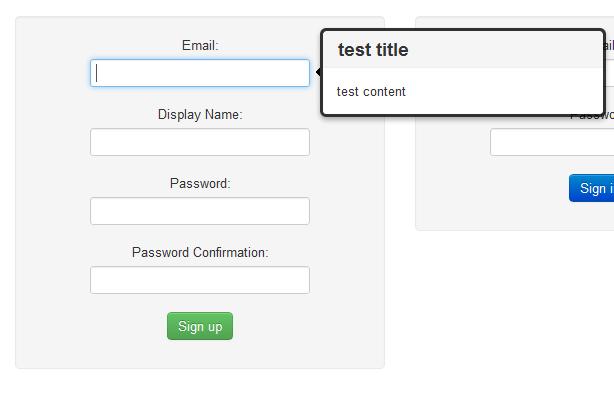
Result:

Popover - Twitter Bootstrap

That’s all there is to it, if you haven’t had a chance to check it out yet make sure you head on over to the official site – there are some pretty neat features.

Allow HTML String – Ruby on Rails

Just a quick post on how to prevent escaping for HTML within a string. Simply use html_safe?.

i.e. The following will show the bold tags as text:

<%= "GOOOOOOOGLE">

<b>GOOOOOOOGLE</b>

Whereas once we add html_safe the text will be displayed in bold:

<%= ("GOOOOOOOGLE").html_safe?>

GOOOOOOOGLE