Select Not Showing Selected Values – AngularJs

Hey everyone,

I had a bit of trouble getting a selected option to show up with AngularJs. It turned out that I needed to add an ng-selected attribute:

    {{command.Status}}
    
        Enabled
        Disabled
        Deleted
    

Check out this Stackoverflow post for more info: http://stackoverflow.com/a/18336858/522859

Windows 10 – Search Not Working

Hey everyone,

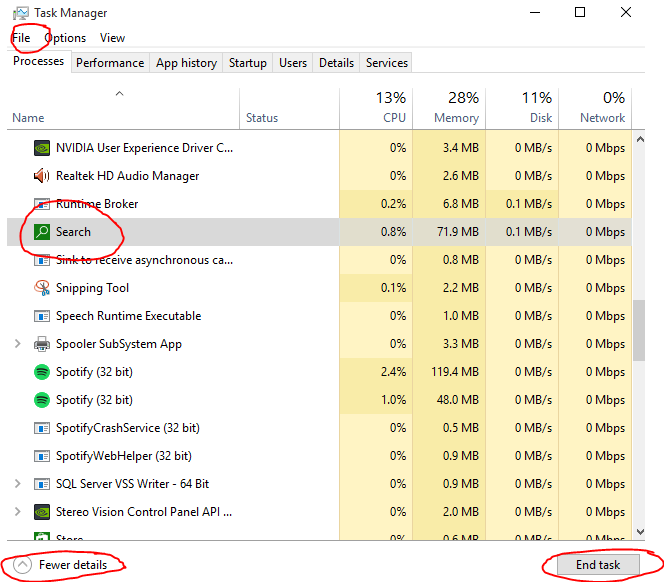
I’ve just upgraded to windows 10, however the start menu search has been randomly breaking. It just seems to load indefinitely. Thankfully there’s an easy fix:

- Start task manager (ctrl + shift + esc)
- Click more details
- Under the processes heading look for Search (green icon under background processes)
- Click on Search and hit end task

The Search process should now restart and start working. If not you can restart it manually using file > run.

Windows 10 search not working

angular js calling services twice – Angular JS

Hey everyone,

I had a few of my AngularJS services being called twice. The issue turned out to be that I’d added a controller to both my route and my view:

app.config(function ($routeProvider) {
    $routeProvider
		.when('/', {
		    controller: 'ProjectsController', /* <---- here */
		    templateUrl: '/Home/Home'
		})
    <!--
  • {{project.Name}}

Removing it from the controller resolved the issue. Check out the following StackOverflow post for more info: http://stackoverflow.com/a/15535724/522859

TF30063: You are not authorized to access asxproject – TFS Online/Visual Studio

Hey everyone,

I ran into the following issue while trying to install the HTML Agility Pack via Nuget today:

TF30063: You are not authorized to access asxproject…

This fixed it for me:
– Go to “Team Explorer”
– Up the very top click on the “Connect to Team Projects” button (power cable looking icon next to the home button)
– Right click on the project and then click connect

Once connected, everything seemed to start working for me again. Check out this stackoverflow post more info: http://stackoverflow.com/a/16700451/522859

Unable to Start Apache – Xampp

Hey everyone,

I was mucking around with xampp this morning and ran into the following issue with apache:

3:41:52 PM [main] Initializing Control Panel
3:41:52 PM [main] Windows Version: Windows 8 Pro 64-bit
3:41:52 PM [main] XAMPP Version: 5.6.3
3:41:52 PM [main] Control Panel Version: 3.2.1 [ Compiled: May 7th 2013 ]
3:41:52 PM [main] You are not running with administrator rights! This will work for
3:41:52 PM [main] most application stuff but whenever you do something with services
3:41:52 PM [main] there will be a security dialogue or things will break! So think
3:41:52 PM [main] about running this application with administrator rights!
3:41:52 PM [main] XAMPP Installation Directory: “c:xampp”
3:41:52 PM [main] Checking for prerequisites
3:41:52 PM [main] All prerequisites found
3:41:52 PM [main] Initializing Modules
3:41:52 PM [Apache] Problem detected!
3:41:52 PM [Apache] Port 80 in use by “Unable to open process” with PID 7820!
3:41:52 PM [Apache] Apache WILL NOT start without the configured ports free!
3:41:52 PM [Apache] You need to uninstall/disable/reconfigure the blocking application
3:41:52 PM [Apache] or reconfigure Apache and the Control Panel to listen on a different port
3:41:52 PM [Apache] Problem detected!
3:41:52 PM [Apache] Port 443 in use by “Unable to open process” with PID 7820!
3:41:52 PM [Apache] Apache WILL NOT start without the configured ports free!
3:41:52 PM [Apache] You need to uninstall/disable/reconfigure the blocking application
3:41:52 PM [Apache] or reconfigure Apache and the Control Panel to listen on a different port

In order to fix this, you can just kill the process that is blocking the port. Unfortunately I had IIS on this and needed another solution. As always, stackoverflow had the answer:

– In the xampp control panel, click config (same line as apache) and open the httpd.conf file
– Search for listen 80 and change it to list 8080 (or an alternative free port)
– Save and close the file
– In the xampp control panel, click config (top right)
– Click service and port settings and change the main port (and ssl if necessary) to match your httpd.conf file
– Click save and restart apache (note you may also need to run as administrator)

Check out this link for more info: http://stackoverflow.com/a/25113205/522859
No Entity Framework provider found for the ADO.NET provider with invariant name ‘System.Data.SqlClient’ – MVC5

Hey everyone,

Just an error I came across while trying to use a new solution project:

No Entity Framework provider found for the ADO.NET provider with invariant name ‘System.Data.SqlClient’

The fix for this was simply to run the following command in the package manager console:

PM> Install-Package EntityFramework

Thanks to StackOverflow for the details: http://stackoverflow.com/a/18642452/522859

Dragging a File from File Explorer Causes Google Chrome to Crash

Hey everyone,

A team member found an interesting bug today that caused chrome to go non-responsive. The cause was simply dragging a file from the file explorer onto a drag and drop upload area. It is reproducible on every site I’ve tested, including Gmail and Dropbox.

Reproduce

  • Go to https://mail.google.com
  • Click compose
  • Click attach files (close any of the annoying popups that appear)
  • DRAG a number of files from the file selector window to the new message screen (they will start to upload) (IMPORTANT: these need to be dragged from the file selector popup, NOT a new explorer window)
  • While they are still uploading hit cancel on the file browser window. Browser will go non-responsive

A bug has been reported here: https://code.google.com/p/chromium/issues/detail?id=388661

Twitter Authentication 401 Unauthorized – MVC4/5

Hey everyone,

Just testing out twitter authentication and ran into the following error:

Response Status code does not indicate success: 401 (Unauthorized).

To fix this, all you’ve got to do is go to you Twitter App settings and:
– Add a callback url (doesn’t have to be real)
– Check the ExternalLoginConfirmationViewModel checkbox

Unable to Find GoogleOAuth2AuthenticationOptions – MVC4/5

Hey everyone,

I was following the guide provided via the startup.auth.cs link on how to add Google authentication to your app. The problem I hit was that the example types used weren’t available, specifically GoogleOAuth2AuthenticationOptions.

Thankfully the fix fix for this was pretty easy, simply update OWIN via NuGet:

– Right click on your project
– Go to Manage NuGet Packages
– Click on the updates drop down
– Search for OWIN
– Update all of the relevant options

Thanks to this Stackoverflow post for the solution: http://stackoverflow.com/a/23606431/522859

Request for ConfigurationPermission failed while attempting to access configuration section ‘paypal’ – PayPal & GoDaddy

Hey everyone,

I ran into the following error today while working with PayPal on a GoDaddy hosted server:

Request for ConfigurationPermission failed while attempting to access configuration section ‘paypal’. To allow all callers to access the data for this section, set section attribute ‘requirePermission’ equal ‘false’ in the configuration file where this section is declared.

To fix it, all you need to do is add the requirePermission attribute to the section declaration. Note that this is not where it says paypal but under the configsections heading.